

Best abstract management software: 10 tools compared (Updated September 2026)

Published on 28 Nov 2022 · Updated on 15 Sept 2026
How I compared these tools
For most academic and scientific conferences, the best abstract management software as of September 2026 is Fourwaves. Oxford Abstracts and Ex Ordo are the strongest specialist alternatives, and platforms like Cvent or Cadmium fit enterprise and association events. The rest of this guide explains the trade-offs behind that answer so you can pick for your own event.
Full disclosure: I’m the founder of Fourwaves, so I have an obvious stake here. It’s also why I did the work most roundups skip: I tested 6 of the 10 platforms hands-on with my own accounts (EasyChair, Whova, Oxford Abstracts, Ex Ordo, etc.) and by speaking directly with event organizers. I also relied on demos, webinars and vendor documentation for the rest. I took most of the screenshots myself, and I verified unpublished pricing directly with vendors’ sales teams in July 2026. Where a competitor is the better fit for your event, I say so.
I weighed each software on what actually matters for academic and research conference organizers:
- Submission and review form customization (multi-track, conditional logic).
- Peer review depth: blind settings, reviewer assignment, workloads.
- Program building and book of abstracts.
- Email communication with submitters, authors and reviewers.
- Pricing transparency and a real free plan.
- Setup effort: self-serve in an afternoon versus sales-led onboarding.
I keep this comparison current as vendors ship changes on a regular basis. This guide was last updated in August 2026, and the pricing and features below reflect what I confirmed with vendors in July 2026.
Just want the product, not a roundup? See the Fourwaves abstract management software page.
Want to try it before committing? Fourwaves has a free trial and a free plan that covers the full submission and decision process, the details are on the abstract management software page.
Quick verdict
- Best for research conferences that run real peer review: Fourwaves. Multi-track submission forms with conditional logic, single or double-blind review with field-level visibility, automatic reviewer assignment with conflict detection, workload caps and expertise matching, per-track sub-committees, and accepted abstracts flowing straight into the program and an auto-generated book of abstracts. Same workflow whether you handle 40 submissions or 2,000+. Flat published pricing with a free plan and no per-registrant fee.
- Best for publishing proceedings to journals: Ex Ordo, with its SPIE, BioOne and SSP partnerships.
- Best abstract-only specialist: Oxford Abstracts, highly configurable with strong symposium support and reviewer recruitment form.
- Best for technical program committees: EasyChair, if your team already knows it and requires reviewer bidding or if you wish to publish your CFP on their database.
- Best event mobile app with abstract handling: Whova, if the attendee app experience matters more than review depth.
- Best for large associations on an event-tech suite: Cadmium, OpenWater or Cvent at enterprise scale.
Abstract management software compared at a glance
| Software | Built for | Scope | Free plan | Pricing model |
| Fourwaves | Academic & research conferences | Abstracts + full event | Yes | Flat annual; no per-submission fee |
| Cvent | Enterprise events | Full event suite | No | Quote only; per-registrant |
| OpenWater | Awards, grants & submissions | Abstracts + program | No | Quote only |
| Ex Ordo | Academic & association conferences | Abstracts + full event | No | From $2,000 (verified July 2026); tiered by submissions |
| EasyChair | CS & technical committees | Abstracts only | Yes, up to 20 submissions | Per submission; $1,399 CAD for unlimited use with full support (organizer-reported July 2026) |
| Dryfta | University events | Abstracts + full event | Trial only | From $1,499/yr |
| Attendee Interactive | Large associations and PCOs | Abstracts + program | No | Quote only |
| Oxford Abstracts | Awards and academic events | Abstracts + program | Yes | Transparent, per event |
| Whova | Events led by the mobile app | Full event suite (abstracts add-on) | No | From $1,199 (verified July 2026); scales with attendees |
| Cadmium | Associations on the Eventscribe suite | Full event suite (abstracts add-on) | No | Quote only |
“No” means the capability is not offered or not published by the vendor, and “quote only” means pricing is shared on request. The sections below explain where each tool fits.
1. Fourwaves
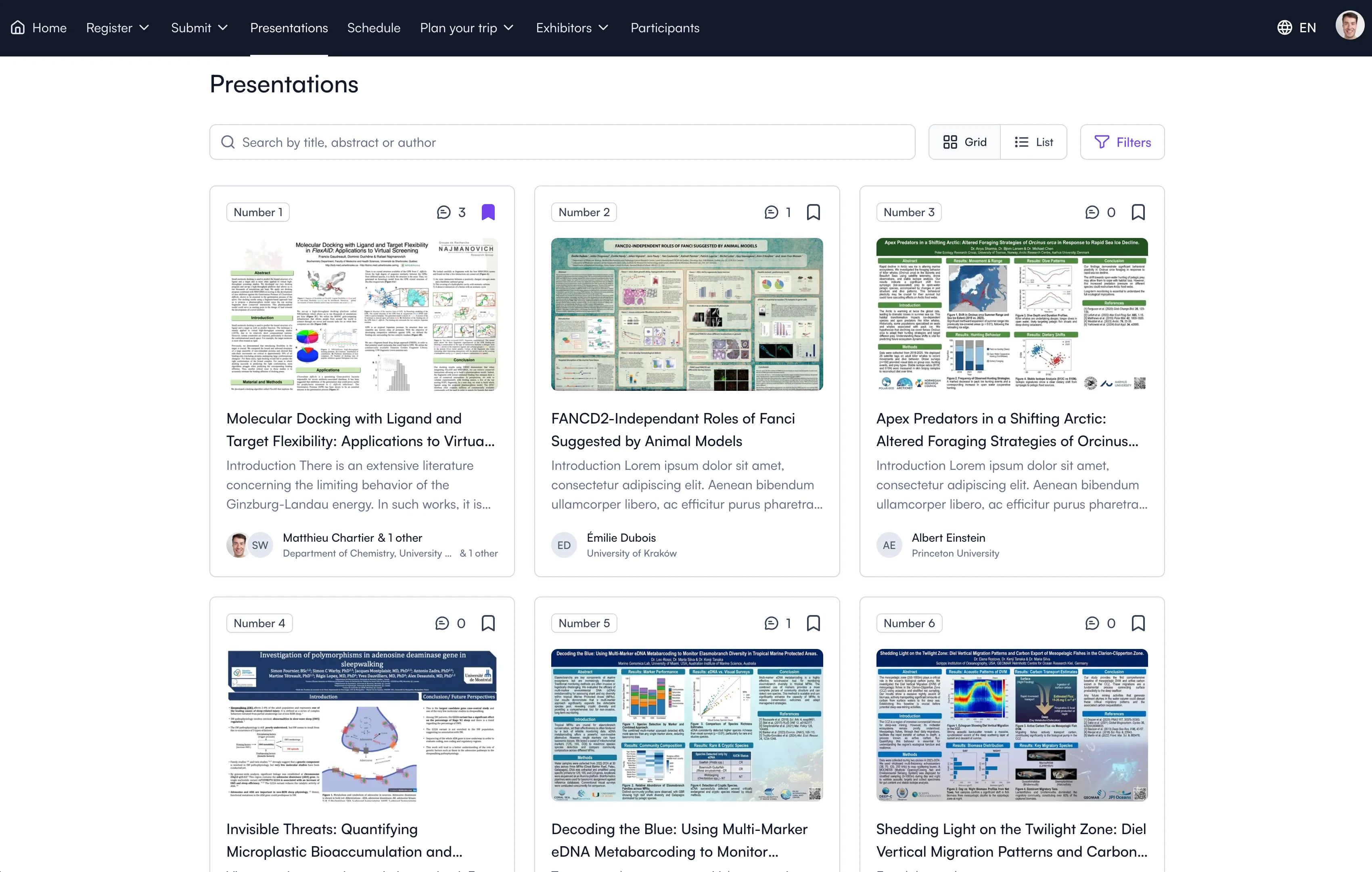
Fourwaves allows you to publish your presentations so conference attendees can easily access the materials and engage with other participants.
Best for: Multi-track research conferences running blind peer review, at any size, that don’t require integration with publishers
Fourwaves is a conference management software built with powerful abstract management and peer review features. It offers the best balance between customization options and user experience. Because it doesn’t have highly technical customization options that very few require, it is able to keep the user interface simple enough so that anyone can launch their call for abstracts in one afternoon.
Standout Features:
- Customizable submission forms which can accommodate multi-track conferences.
- Peer review module with single/double blind settings and field-level visibility.
- Multiple permission levels: Organizer, Program Chair, Track Chair, Reviewer.
- Email communication tools, abstract booklet, presenter certificates and poster board tags.
- Interactive online program with nested presentations.
- Interactivity features to foster conversations and engagement.
Flexible submission forms
The pre-built submission form contains fields for the submission title, authors list and the abstract. It can be further customized with any number of additional questions using the drag and drop form builder: presentation type (poster, oral), funding sources, etc.
It also has specific fields for file uploads: poster, figures, powerpoints and video files, which can be completed by submitters once they’ve been accepted, perfect for conferences that have a multi-stage process. You can define the abstract’s maximum number of words, the submission period and more. Just like OpenWater, Fourwaves allows you to charge for submissions, which is something very few platforms allow, a nice feature to prevent AI generated submissions.
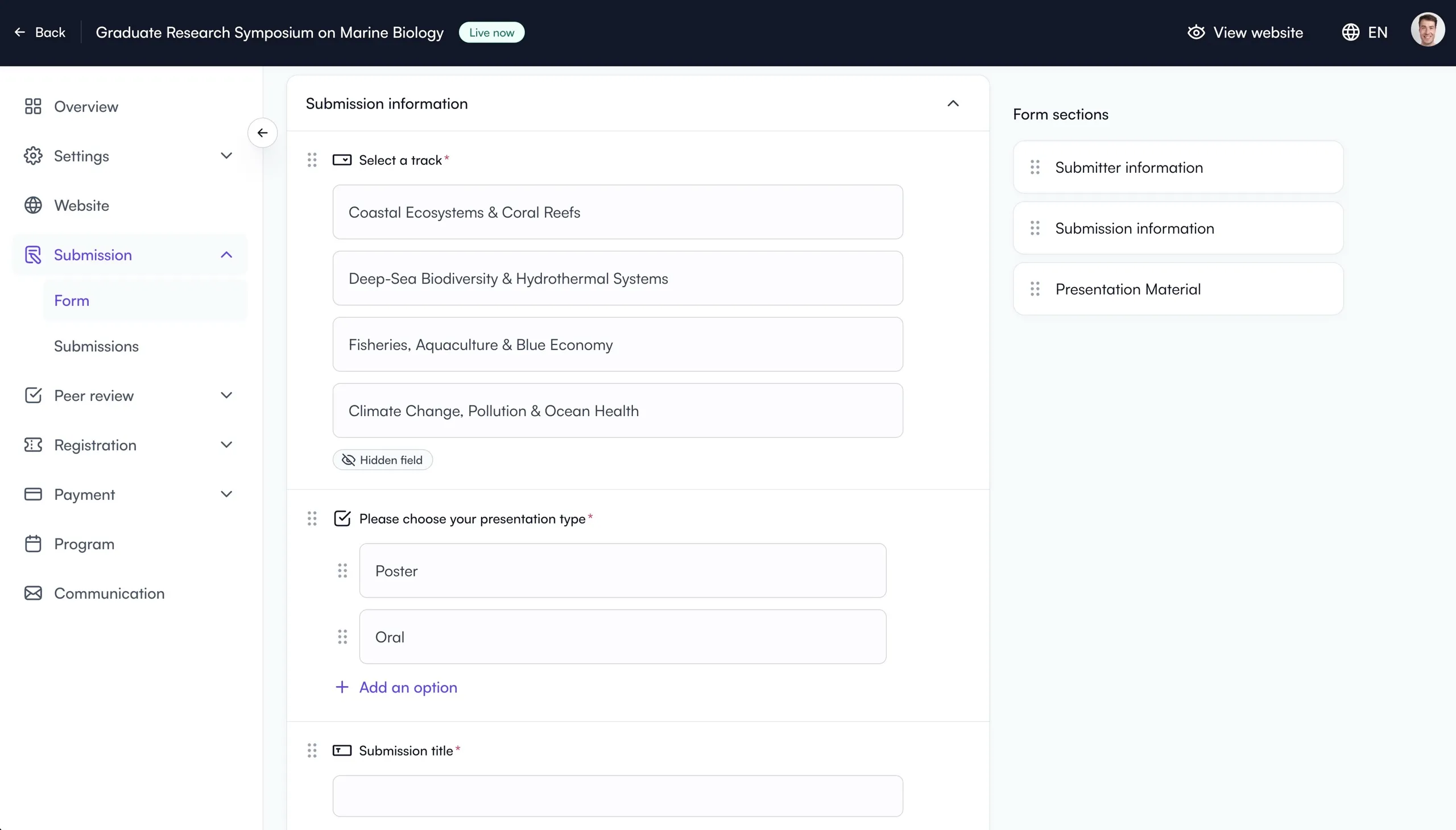
Build your call for abstracts with drag-and-drop fields, tracks, and presentation types.
You can segment your form into distinct sections and use conditional logic to ask certain questions to specific submission types. For example, you can require oral presenters to answer specific questions that poster submitters don’t.
This conditional logic can also be used to collect session proposals, but if session proposals are core to your submission process, you’ll be better suited by a platform like Ex Ordo or Oxford Abstracts.
Certain form options can also be made available within specific dates which is useful to close oral before poster submissions, allowing the committee more time to manage reviews for oral submissions. This is not a feature other platforms I tested or used have, they require separate submission forms which becomes tedious to manage.
Peer review and assignments
Regarding peer-review aspects, Fourwaves has a dedicated module with a fully customizable form. Add any number of fields:
- Score field type.
- Simple and long text answers.
- Multiple choice.
- File uploads (eg. for Word documents with track changes by the reviewer).
You can determine which submission form fields reviewers can see (hide submitter and author information for blind reviews). You can also decide to share review results directly to submitters and decide to hide reviewer names (for double-blind).
Fourwaves has always been well known for the clean and simple user experience and that principle applies to the reviewer experience as well. The reviewer screen is clean enough that reviewers actually complete their assignments, instead of giving up on a clunky interface and emailing you their scores in a spreadsheet.
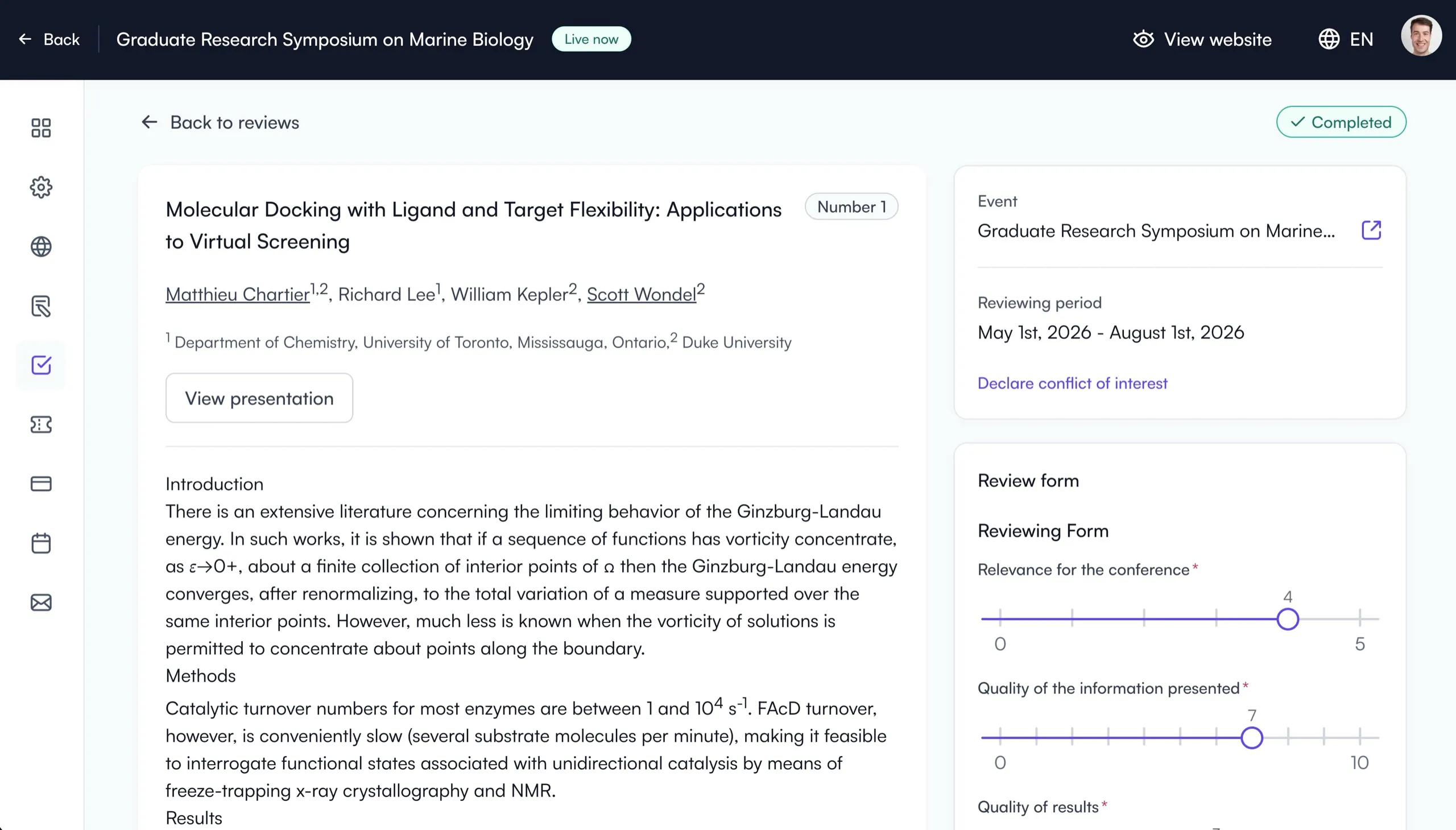
What reviewers see: the abstract beside a clear scoring form, so reviews actually get completed.
Assignments can be made manually or automatically, with:
- Automatic conflict detection.
- Max reviewer workloads.
- Topic of expertise matching.
Decisions can be saved per submission with custom presentation types to stay organized, and email communication allows you to bulk send acceptances. You can choose to contact submitters, presenters or co-authors only, a level of customization few platforms offer which allows for targeted communications. Emails can be branded with your conference banner and logo.
From decisions to your online program
Submissions can be placed into your program sessions and you can determine the presentation times for each and drag to reorder. Another cool feature is the ability to export your program to a Word or PDF file in one-click.
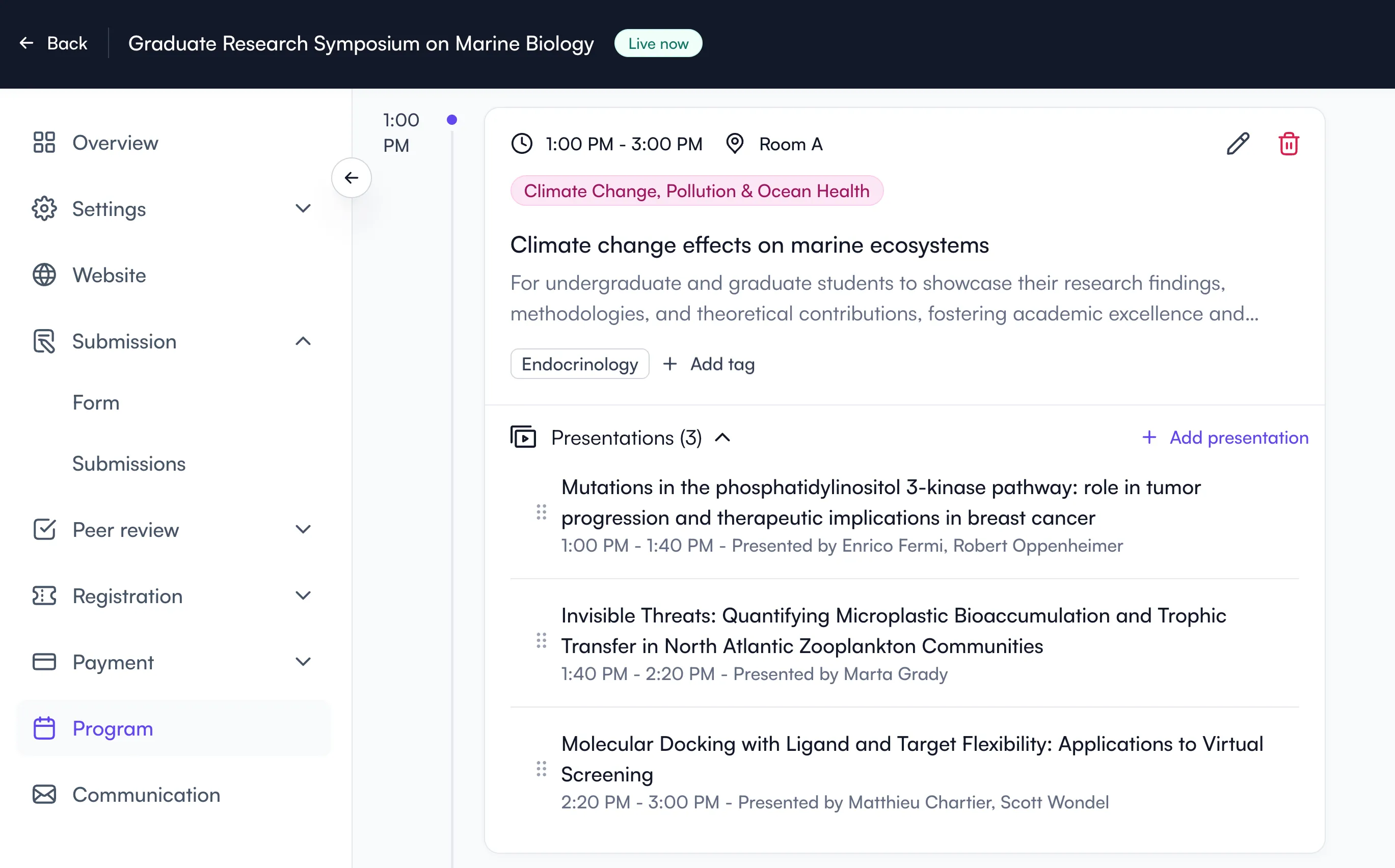
The program builder allows you to build sessions and add your accepted presentations.
Other features worth mentioning:
- Tracks management: multi-track events can create sub-committees responsible for managing submissions, reviews and sessions of specific tracks.
- Poster board tags: a unique feature no other platform has that allows you to print poster board tags with a QR code that help presenters know where to place their posters on-site.
- Presenter certificates: another feature that only Cvent also offers, allowing organizers to generate and distribute custom certificates. You can insert the presentation title with the presenter name, your logo, signatures and more.
- Abstract booklet styles: each element (titles, authors, abstract, etc.) has its own style in Word, so the whole booklet can be adapted to your conference’s layout.
I often hear Fourwaves is easy enough to learn that organizers can create an account and launch their call for abstracts in one afternoon without having to talk to a sales rep.
Many choose Fourwaves to run their call for abstracts and peer review only, then add registrations and their event website the next year. Many appreciate the focus on discussions and engagement that stems from the academic/research origins of Fourwaves where collaboration is important and the fact that organizers can keep their content online for free for as long as they need.
Accepted abstracts also reach attendees on their phone: the free Fourwaves conference app on iOS and Android shows the program, a personal agenda, the posters and slides authors uploaded and the participant list, works offline and is included on every plan. Ex Ordo offers the Guidebook app at about $3,500 USD per event, on a quote we received, and Oxford Abstracts and EasyChair have no attendee app at all (their own sites and our vendor notes, checked September 2026).
Overall, Fourwaves is a great solution for research conferences that need a real review process behind the submissions, from a 40-abstract departmental symposium to a society meeting with 2,000+ submissions, with a clean user experience, pro-active and fast customer support as well as transparent pricing.
Pro Tip: Running the whole event, not just the abstracts? See our comparison of the best academic conference management software.
Not sure which tool to choose for your abstracts?
2. Cvent
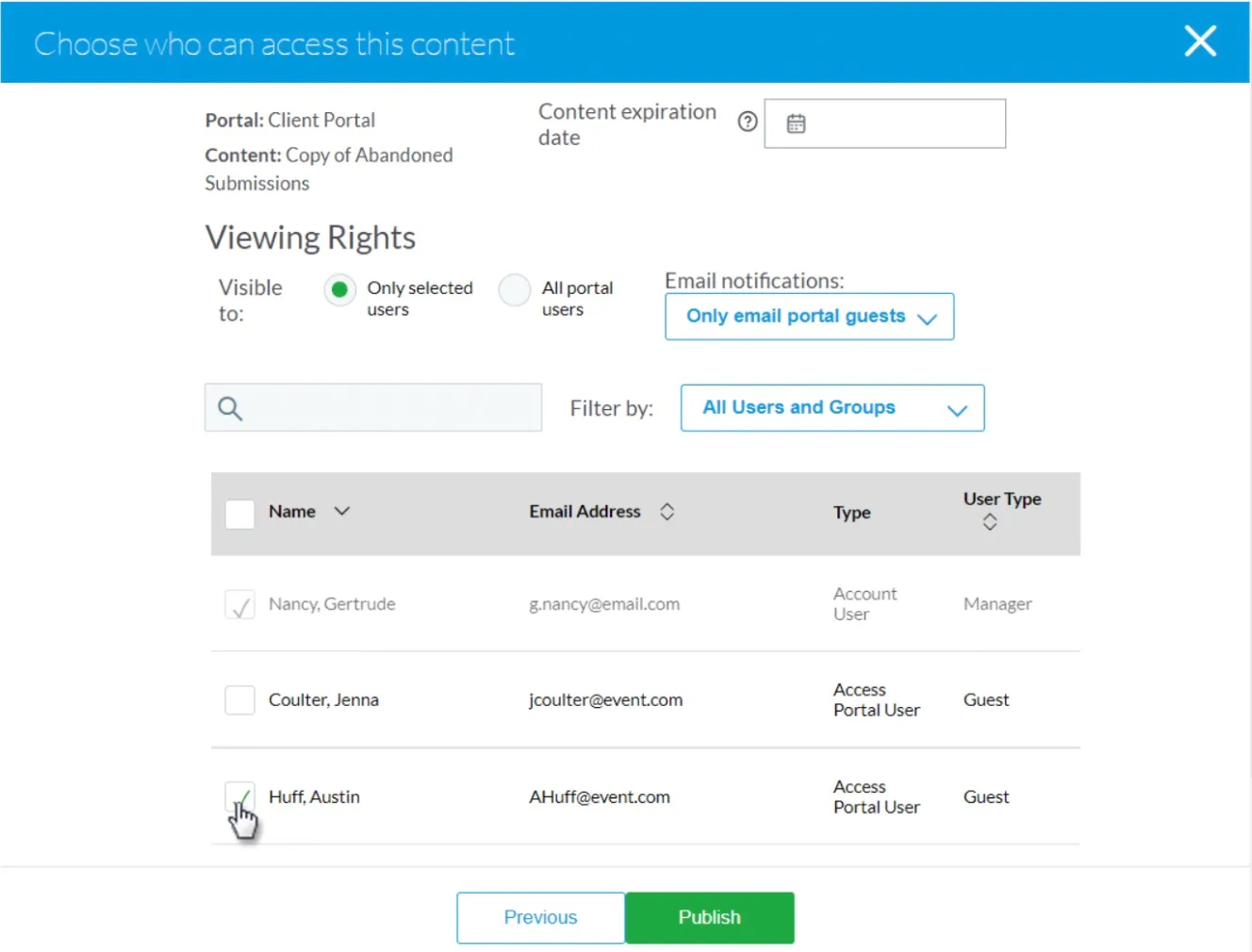
Cvent allows you to customize the submission options.
Best for: Large, complex events that need enterprise tooling
Cvent provides a complete event management solution, from the peer review process to publishing accepted abstracts. Its customizable forms and email automation make it very versatile.
Standout Features:
- Customizable submission forms tailored to any event type.
- Powerful email automation for invitations, confirmations, and reminders.
- Reviewer tools to assign, evaluate, and approve submissions.
- Agenda creation and content publishing for event websites.
Many think of Cvent as a generic tool with no abstract-related features. This is rarely reported, but it does contain most of the features you’d expect in this category. For example, you’re able to add reviewers and define their topic(s) of expertise. You can also automatically assign them to submissions or do the process manually.
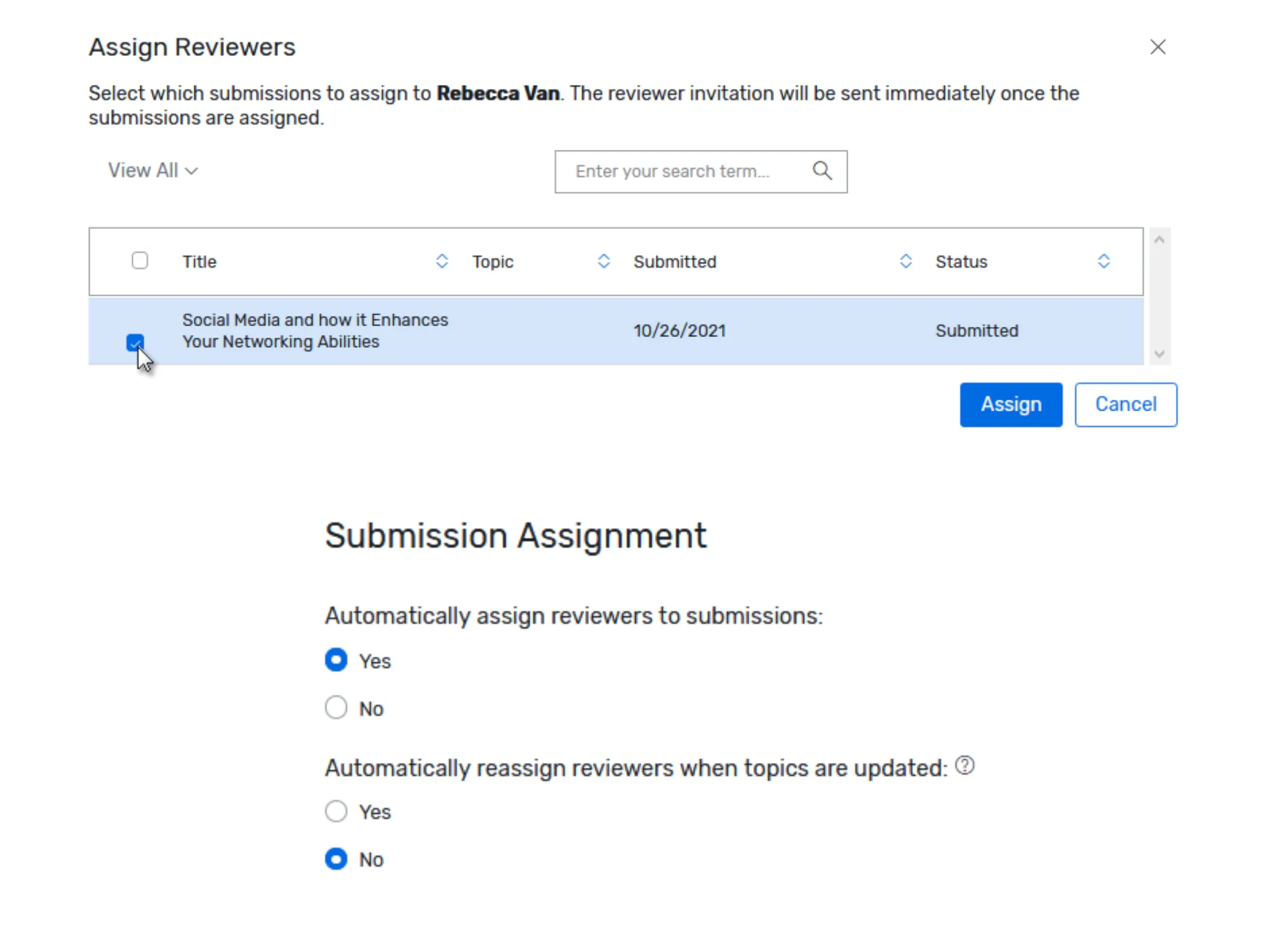
You can select submissions and assign reviewers or choose to assign them automatically.
The setup is not very intuitive and the learning curve is big, but does allow to have multi-step submission forms, perfect for very large conferences. To edit the submission form, you need to go through the site designer, where you’ll see the different setup options with “widgets” (basically the equivalent of form steps) that you can reorder.
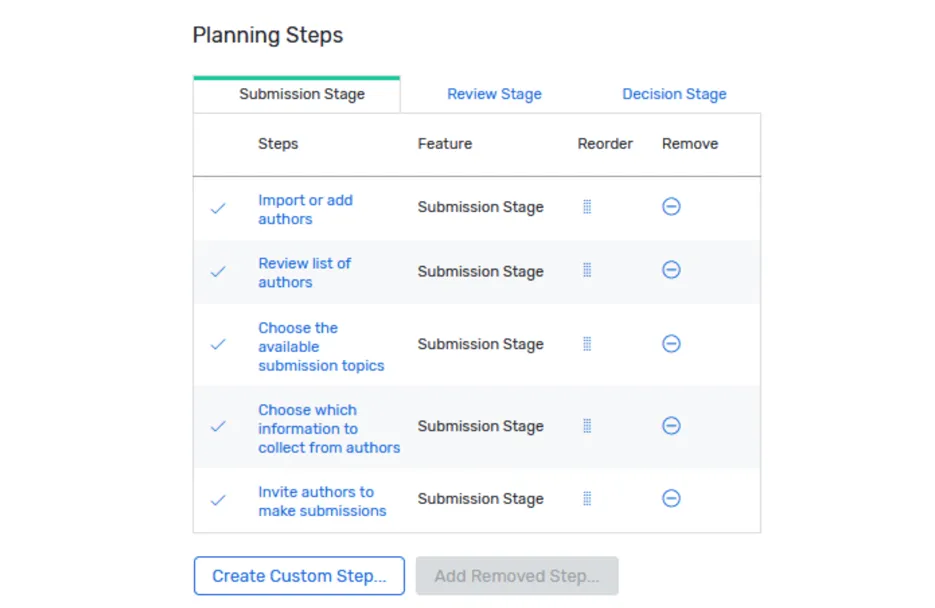
A screenshot I took showing the steps you can add and their order in the submission setup. You can see the review stage and the decision stage as well in separate tabs.
Once your abstract and reviews are in, you can accept submissions. When conference organizers compare these platforms, one thing they look for is the ability to seamlessly nest submissions under sessions of their program. One thing not documented often about Cvent that is good to know is that submissions turn into Sessions, you can’t nest them IN a session. Also, once a session is created from it, if edits are made to submissions, it doesn’t reflect in the program, which can cause headaches for last minute changes.
There are also email automations you can set up in advance which is very useful, for example to contact reviewers or presenters at a specific time. I once spoke to an event organizer who had a bit of trouble with the automations that didn’t work well and the solution was to pay for premium support to have a Cvent support agent troubleshoot with her.
In my conversations, Cvent users tend to be long-time customers who stayed because the time they invested setting up their forms and workflows discouraged them from starting over again. Usually they start looking around because of the high price tag. Most run academic events that never touch its full enterprise toolkit, so the cost is hard to justify.
That being said, it genuinely earns its keep in very large conferences (for example with exhibitors): the on-site mobile app and on-site badge printing are excellent at scale if you need those.
Pro Tip: If you run research conferences and do not need the enterprise overhead, see why organizers choose abstract management software like Fourwaves, Ex Ordo or ConfTool instead.
3. OpenWater
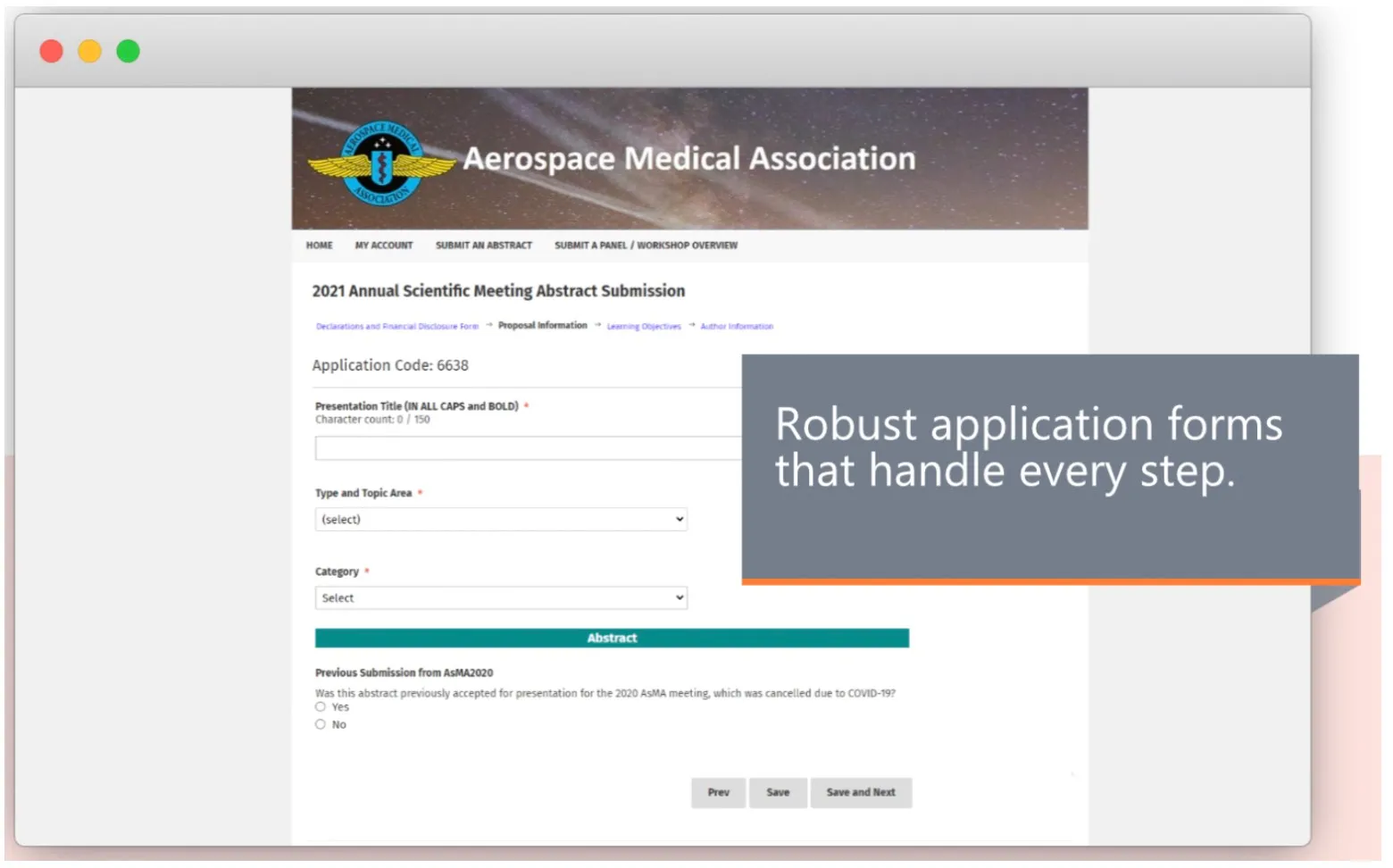
A call for proposal page on OpenWater.
Best for: General purpose submissions (awards, grants, competition)
OpenWater is a versatile and robust platform that allows organizers to duplicate submission setups for recurring conferences, awards or grant submission, streamlining multi-year event planning.
Standout Features:
- Duplicate abstract collection forms for easy annual setup.
- Centralized dashboards for session and submission management.
- Peer review tools to simplify scoring and categorization.
One thing not explicitly mentioned on the web that can confuse someone comparing these tools: what OpenWater calls “Program”, is the equivalent of a submission form and review workflow. It’s not an actual conference program (schedule).
For example, if you need to collect session submissions + abstract submissions, you’ll need 2 “programs”. Also what they call “Rounds” is what other abstract software calls “stages” (steps in the submission management lifecycle).
You can use OpenWater to collect abstract and session submissions. You can also customize the reviewing form (what they call “Evaluation form”) with custom scoring ranges. You can also classify them as accepted or rejected for your different presentation types (what they call “Winner types”).
OpenWater also allows you to build sessions and choose which form fields populate your session data. This makes it quite flexible, but sometimes a bit complex to set up. What they call “Applications” is a submission that you can insert in your program to build the final schedule. One cool feature is the ability to edit the exact number of minutes a submission takes in a session (something Fourwaves and Cvent also allow you to do).
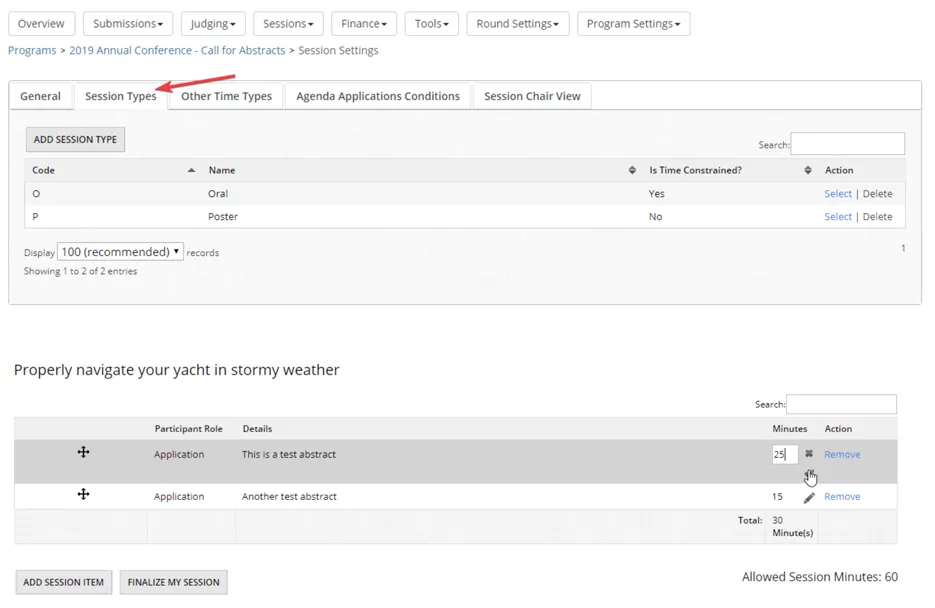
Top: The section where session types can be configured in OpenWater. Bottom: When an application is added to a session, you can indicate the number of minutes it takes in the session.
One thing unique to OpenWater and Fourwaves, is the ability to charge a price for submissions. In 2026, with AI generated submissions, I heard many conference organizers charge a small fee to submit. This is a nice feature that many will find useful.
In conclusion, the choice of words used by OpenWater is not familiar to most conference organizers. That speaks to the generic nature of the software, not purposely built for academic and research conferences. That being said, it’s a powerful platform. The price tag is unknown looking at their website and you need to talk to sales to learn more.
Pro Tip: Learn more about simplifying abstract evaluation with our article on Conference Reviewer Processes.
4. Ex Ordo
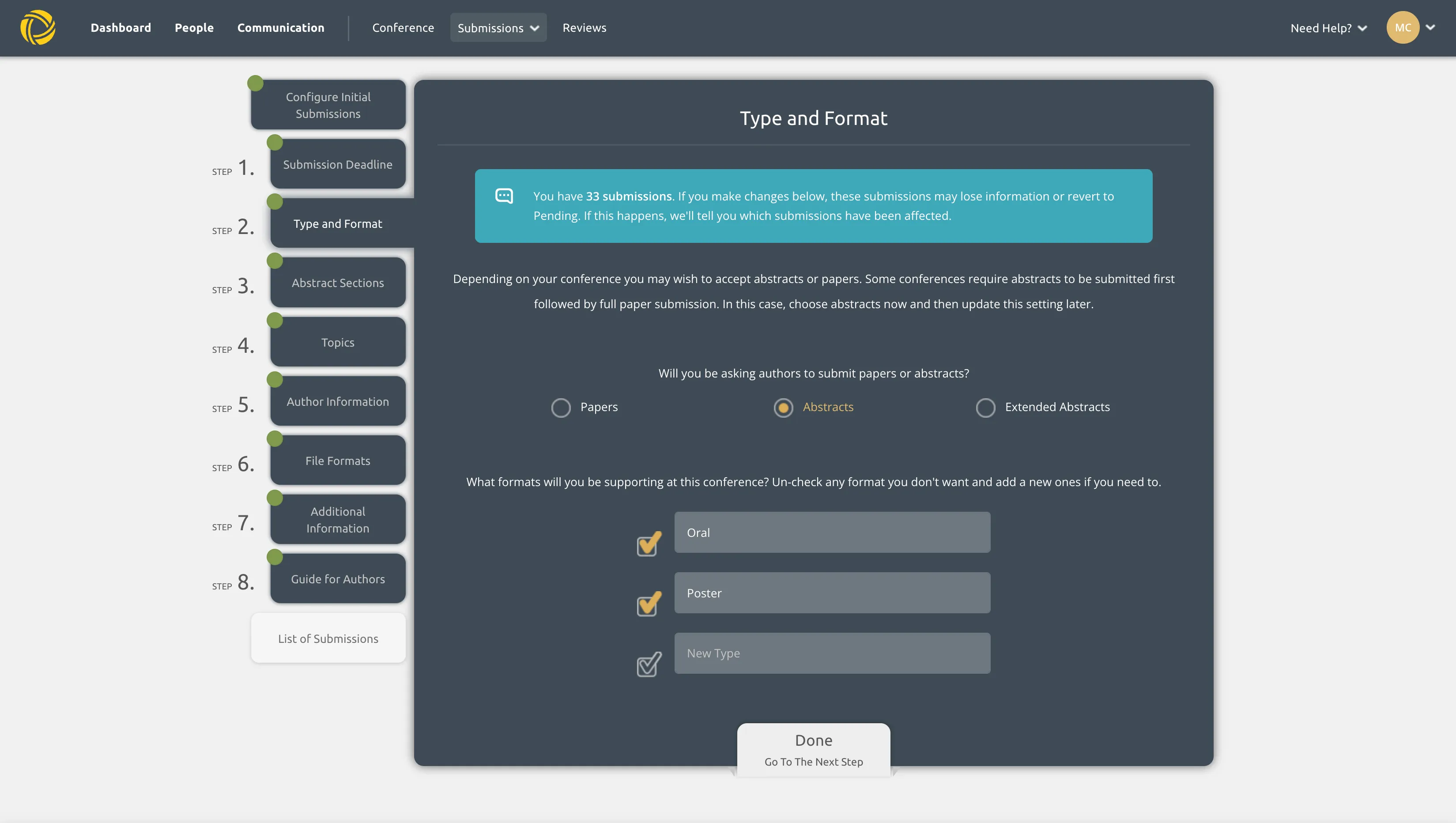
Screenshot of my Ex Ordo portal showing the submissions setup
Best for: Academic conferences focused on publishing
Ex Ordo specializes in managing submission reviews with tools to track reviewer progress and send automated reminders, and it seems to be leaning into the publishing side recently. It partners with SPIE, BioOne and SSP. That makes it suitable for larger conferences that wish to publish their proceedings to a journal, similar to IEEE.
Standout Features:
- Customizable submission forms and review processes.
- Automated notifications for reviewers who fall behind.
- Allocation engine.
- A unique cards display to track KPIs.
Their dashboard is well thought out. It contains cards, one for each workflow (reviewer allocation, reviewer progress, submissions, etc.) that helps see key metrics for each and also quick links to common actions like emailing reviewers. Having actions in context with their associated metrics eases the learning curve. One small downside of this we hear from event organizers, is that it forces you to follow a specific workflow, making Ex Ordo less flexible in some cases.
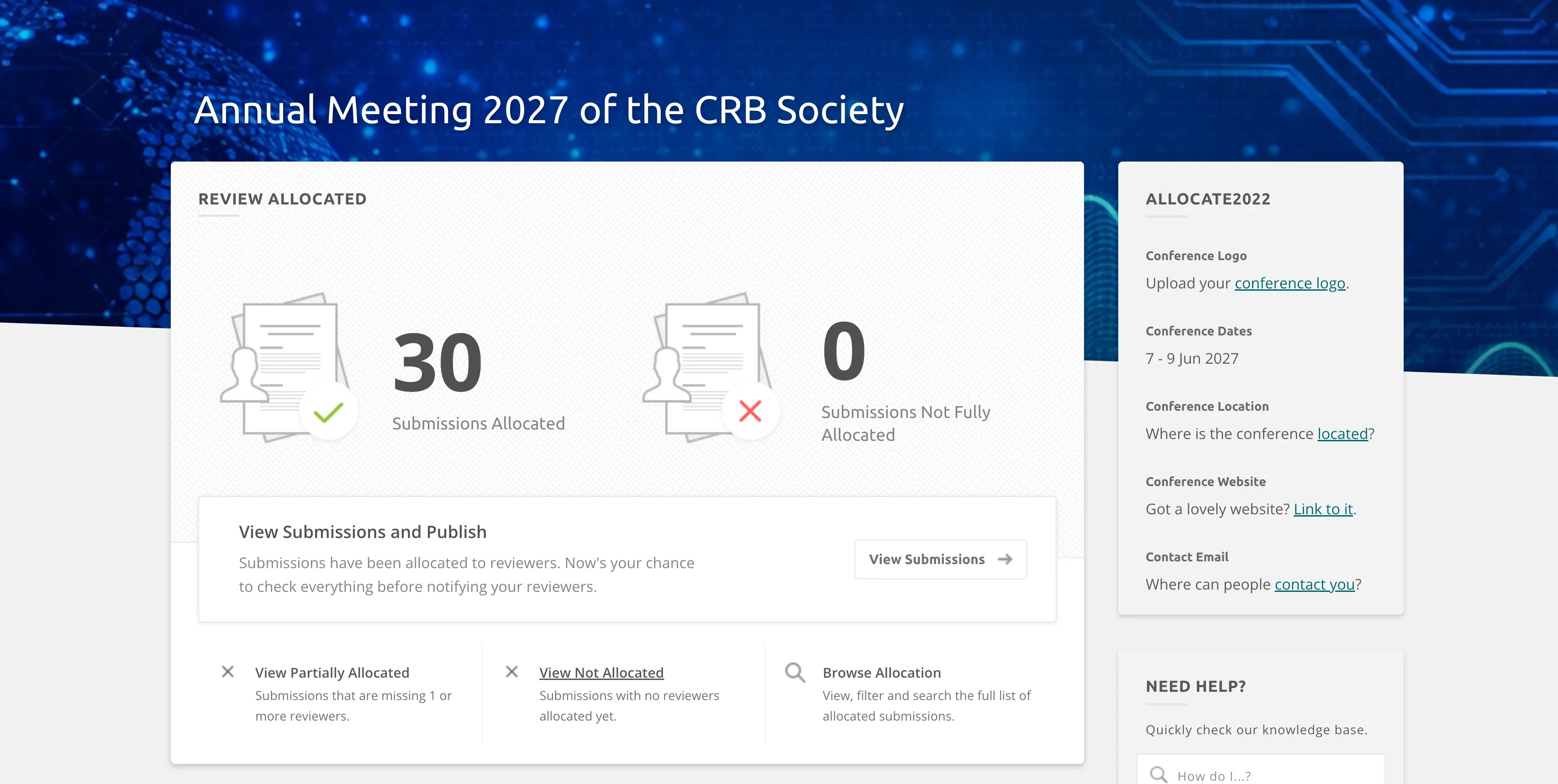
A card in the dashboard showing submissions with allocated reviewers.
Their allocation engine works really well. It basically does a pre-allocation, matching reviewers with submissions following allocation rules you define (nepotism, workload, topic matching). Then you can review the allocations by submission, make edits for example switch a reviewer with another in one-click, then confirm to start the reviews.
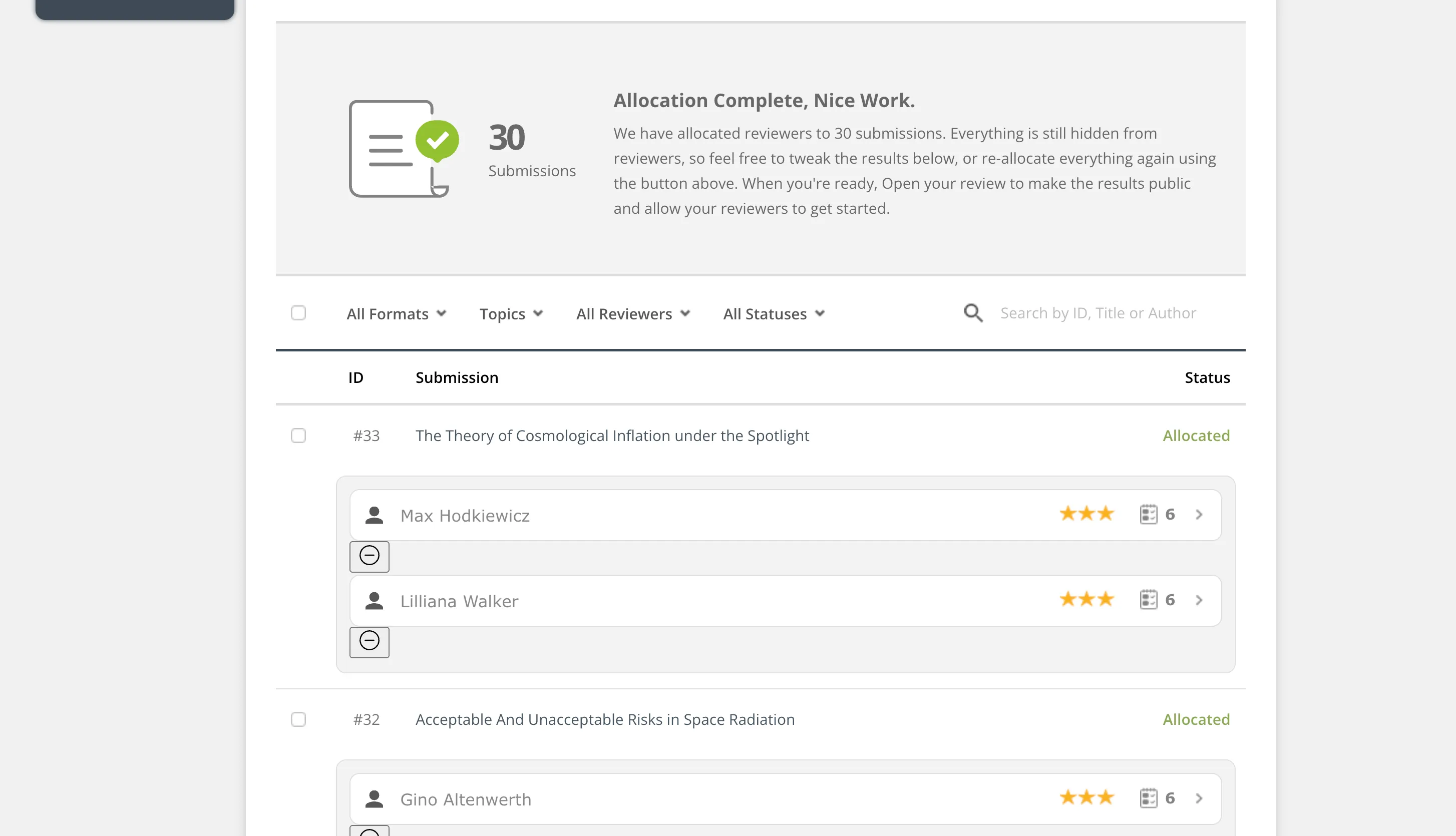
Once the allocation is complete, you can click on a reviewer for a given submission and switch it for another.
Once reviews are allocated, you can decide to edit the invitation email sent to reviewers (or not send an email at all). These types of small workflows really facilitate the work of program chairs.
Last year, in 2025, Ex Ordo added calls for panels/sessions, a welcomed expansion, but the submission forms can still feel rigid. Also, you cannot try the platform on your own because access runs through sales.
Ex Ordo keeps their pricing hidden, but I verified their pricing structure directly with the Ex Ordo sales team. They have a cost structure with different tiers based on the number of submissions: 125 ($2,000), 250 ($3,500), 500 ($5,500) and 1,000 submissions ($8,000). They also have for each tier a cost per extra submission: $16, $14, $11 and $8. So the more submissions you have, the less extra submissions cost. That still makes Ex Ordo one of the most expensive solutions out there. They also have an add-on for the abstract booklet (+$650). I’ve had organizers that managed to negotiate the price down, which is good to know if you prefer their solution.
I also see teams move from Ex Ordo to Fourwaves for a shorter learning curve, and since Ex Ordo is based in Europe, organizers in North American time zones occasionally find support hours limiting.
5. EasyChair
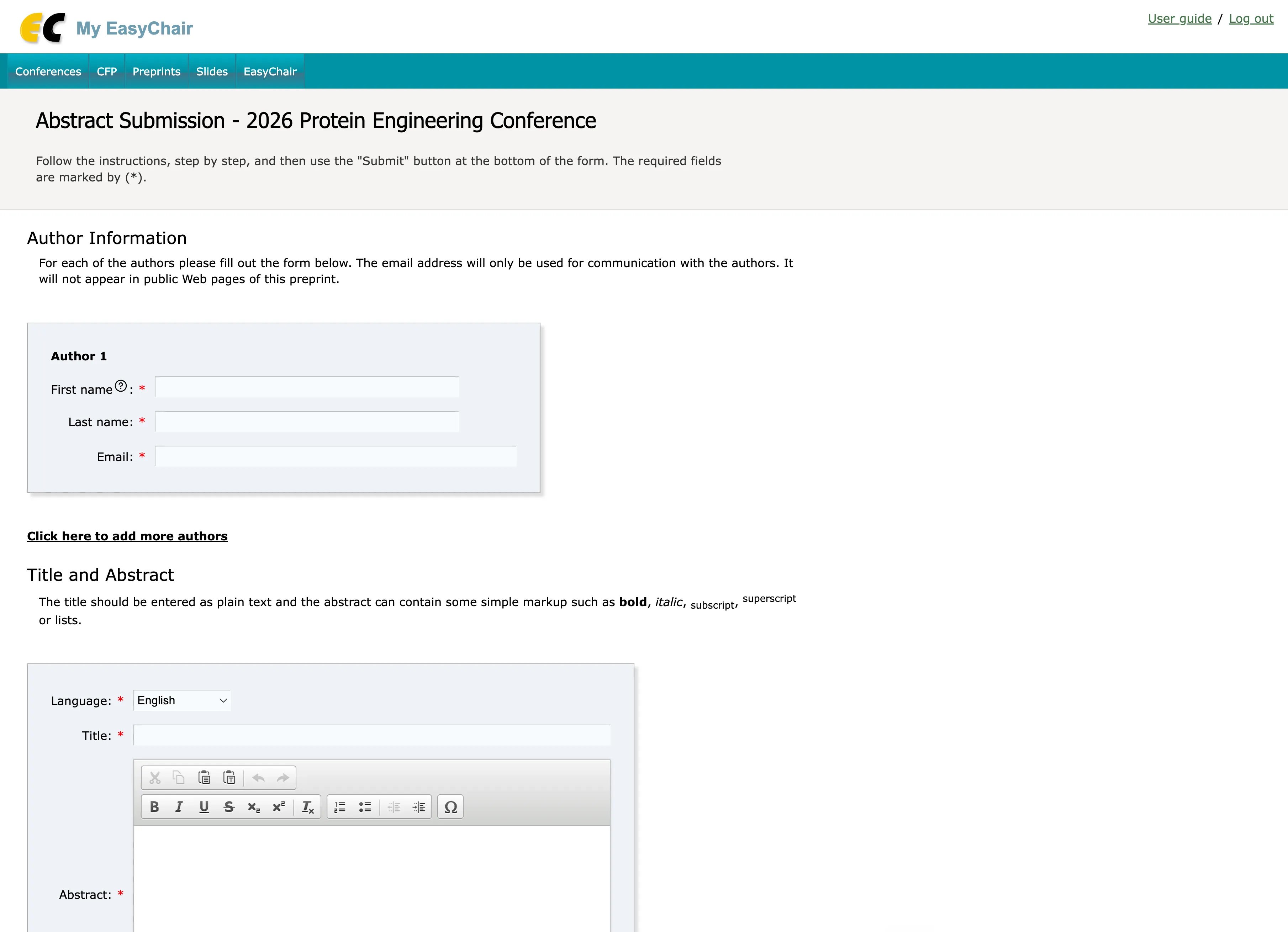
The EasyChair submission form, an interface that has barely changed since my grad school days
Best for: Teams already used to the long-standing academic standard
EasyChair is without a doubt the platform almost everyone in academia has used at some point, and it is genuinely capable at abstract submission and peer review.
Standout Features:
- Smart CFP for flexible submission options.
- Tools for online discussions during the review process.
- Author rebuttal management to improve research submissions.
While I haven’t used EasyChair in a real use case like I had the chance to for other software in this guide, I did hear a lot about the user experience. One thing I often hear is the deep customization options for technical conferences. While not all organizers require this, it’s worth noting because it speaks to the specialization of EasyChair for specific types of conferences that follow certain peer-review flows like bidding, where reviewers bid for submissions they want to grade. I noticed over the years that this tends to disappear and is replaced by smart AI assignments that save a lot of time for everyone and ensure high quality assignments.
That being said, EasyChair does offer the general features one would look for in this category: customizable forms, different levels of permissions, email communication and export capabilities.
They also allow you to publish your call for abstracts on their own directory which can help increase visibility for your call for abstracts.
The big catch is the user experience and the support. The interface feels dated, and when a reviewer screen is clunky, reviewers stall, which leaves you emailing people to finish their assignments. The help docs are incomplete, not up to date and it’s hard to get actual support. Typically, those who use EasyChair have done it for a number of years and know how the system works: it hasn’t changed much for the past 20 years.
Public pricing is also hard to pin down, so here is a firsthand number. Pavel Andreev, full professor of Business Analytics and Information Systems at the University of Ottawa’s Telfer School of Management, used EasyChair for abstract submissions and peer review on his conference. “I paid $1,399 Canadian for full support and unlimited functionality,” he told me in July 2026.
An important thing organizers keep mentioning for the past year is how hard the free licence has become to get: EasyChair still lists one on its pricing page, capped at 20 submissions (checked September 2026), but organizers tell us it is not available to them in practice. So in conclusion, it’s powerful and tailored for technical abstract management and perfect if someone in your committee knows how to use it. Do know it involves a big learning curve and the customer support is hard to get.
If you are weighing EasyChair against Fourwaves, see the full Fourwaves vs EasyChair comparison, or compare the wider field in our guide to the best EasyChair alternatives.
6. Dryfta
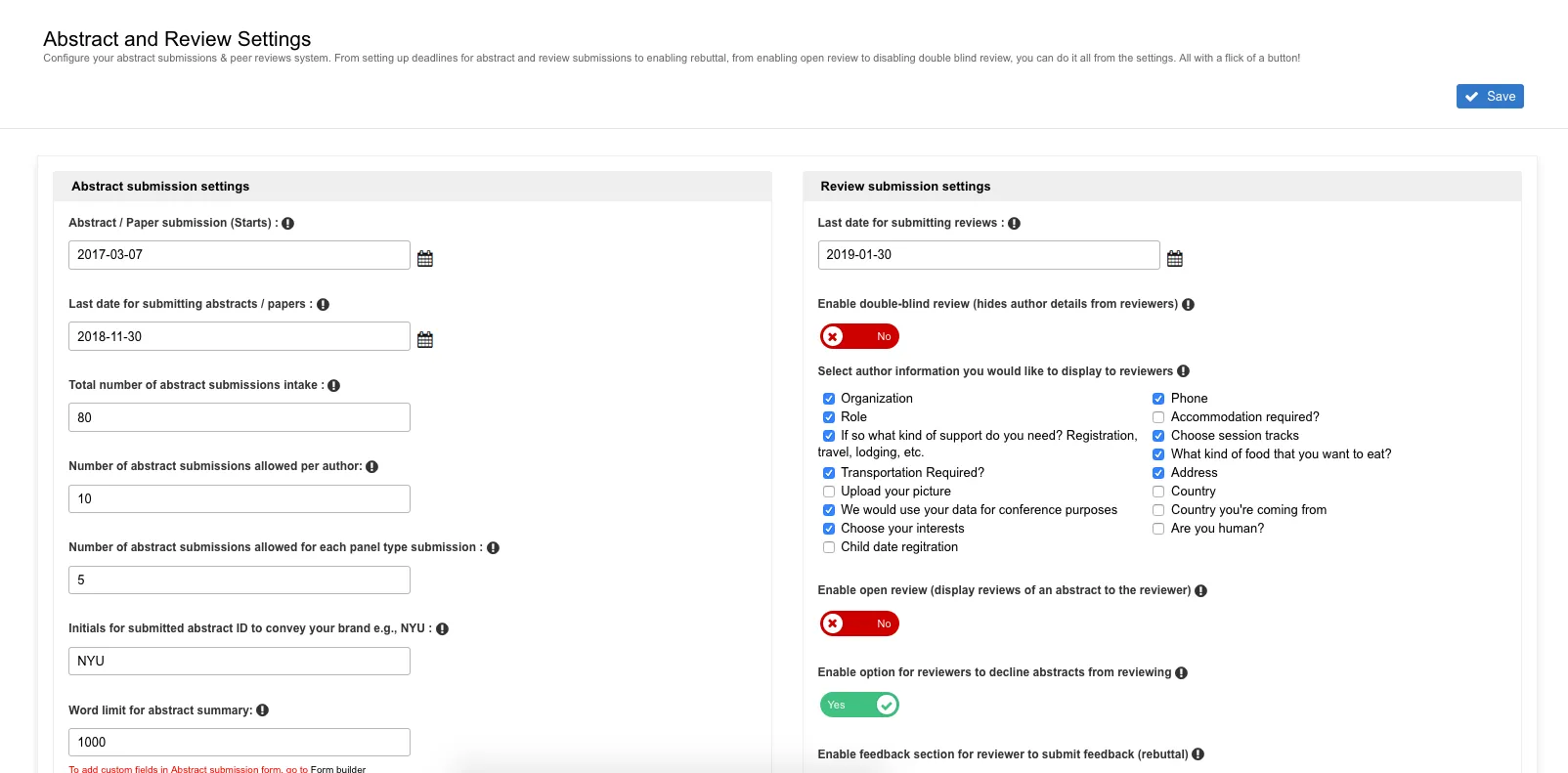
There are many submission and review options on Dryfta to adapt it to your usual workflow.
Best for: University-Specific Events
Dryfta caters specifically to university events with tools to manage submissions, reviews, and session scheduling.
Standout Features:
- Automated notifications for late submissions or reviews.
- Support for single-blind and double-blind review processes.
- Export data as CSV or PDF for post-event reporting.
Dryfta packs in a lot of features and options, which is both its appeal and its potential drawback. It is the only platform for which I never managed to speak with an event organizer that used it or had the chance to test myself. That is the reason this section is lighter than other software I compare here.
Looking at their website, they seem to have most of the features one looks for: custom form fields, file uploads, single/double-blind reviews, automated author notification, abstract book.
They’re the only platform I’ve seen along with Fourwaves that supports .mp4 files in the submission forms.
Their pricing is available online which is helpful and starts at $1,499 / year (in USD) for up to 100 abstract submissions. The next tier that follows is $14,999 / year with up to 1,000 abstracts, which is a steep price increase.
7. Attendee Interactive (by Momentive Software)
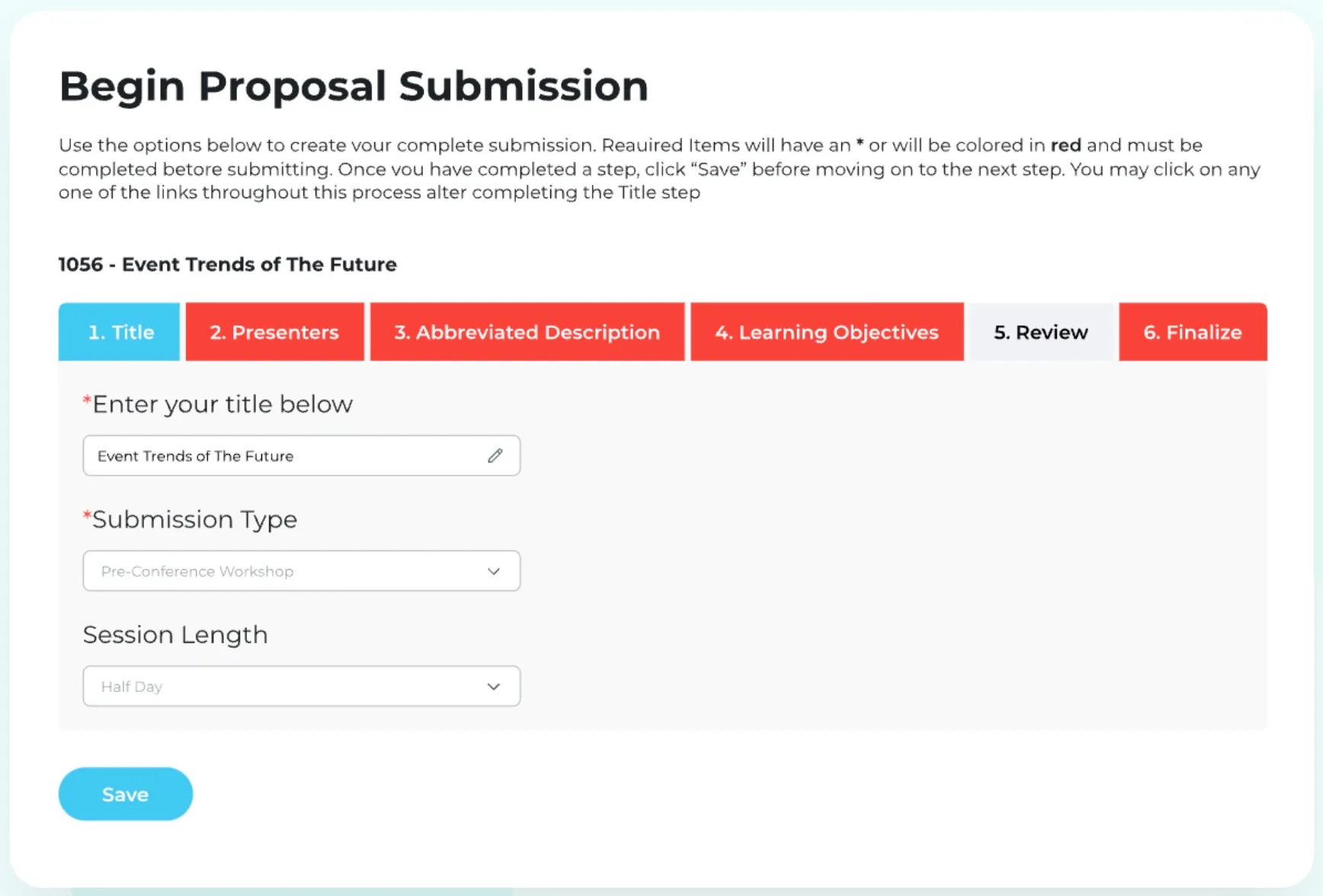
An example of a submission form on Attendee Interactive.
Best for: Associations, PCOs and enterprise-grade educational events
Attendee Interactive is part of the Momentive Software suite that offers a wide range of tools, including association management, fundraising and LMS tools. It targets large associations, PCOs and enterprise-grade customers. There isn’t a lot of information available publicly about their abstract management system so I had to attend a specialized webinar to learn more.
Standout Features:
- Multiple submission types.
- Document and speaker data uploads.
- Reviewer recruiting forms.
- Program and session builder.
Their submission process works through a multiple step system where organizers can set up the information asked to submitters at each step (images, videos, category, submitter information). Submitters have access to their own portal to see the progress of their submissions.
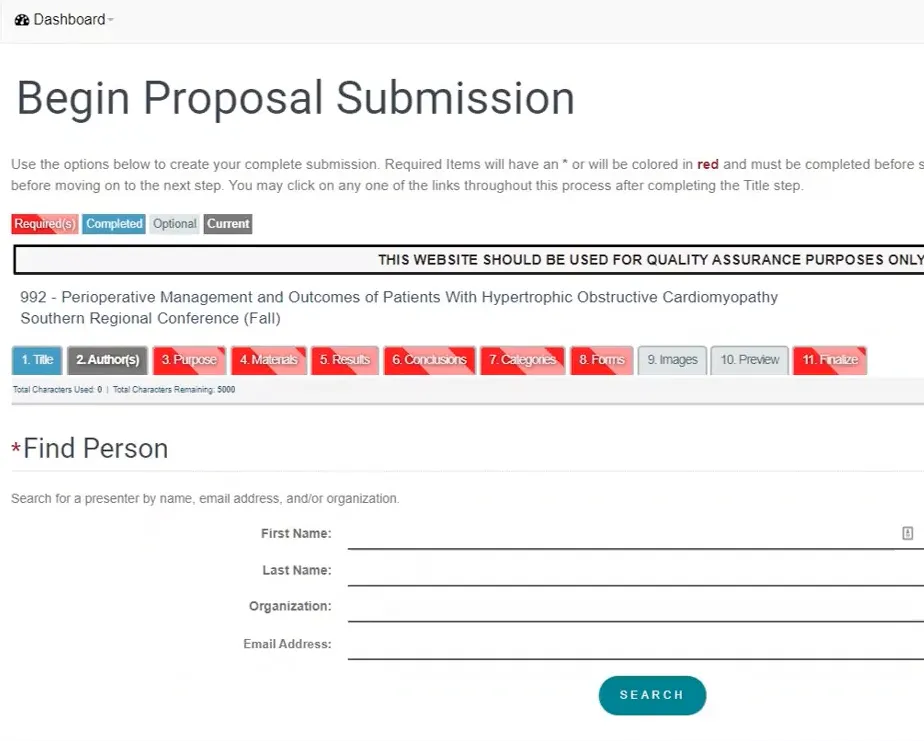
The multi-step interface that submitters go through to submit their abstract.
As you can see from the screenshot above, there are a lot of steps you can add for your submission process. This is typical of large enterprise/association events with very specific submission processes.
They have a call for reviewer module to source potential reviewers, allowing them to be paired with the submissions you received. Another platform that has this feature is Oxford Abstracts. You can of course configure the peer-review form, set blind review settings and more.
One feature that not a lot of platforms have is the ability to create custom reports. Other platforms like Cvent have this level of report customization and it is often required by large associations that work with PCOs who coordinate with multiple stakeholders who require specific reports along the way.
They have a white-glove support approach where you have a dedicated customer success manager that helps you through the setup, which is necessary, especially if it’s your first time. Attendee Interactive is the type of software you purchase for many years and integrate with your association ecosystem and CRM.
For small and mid-size research conferences Attendee Interactive is not a good fit: it’s expensive and complex to set up, but if you have the budget, they have the experts to help you and do a lot of the heavy lifting for you.
8. Oxford Abstracts
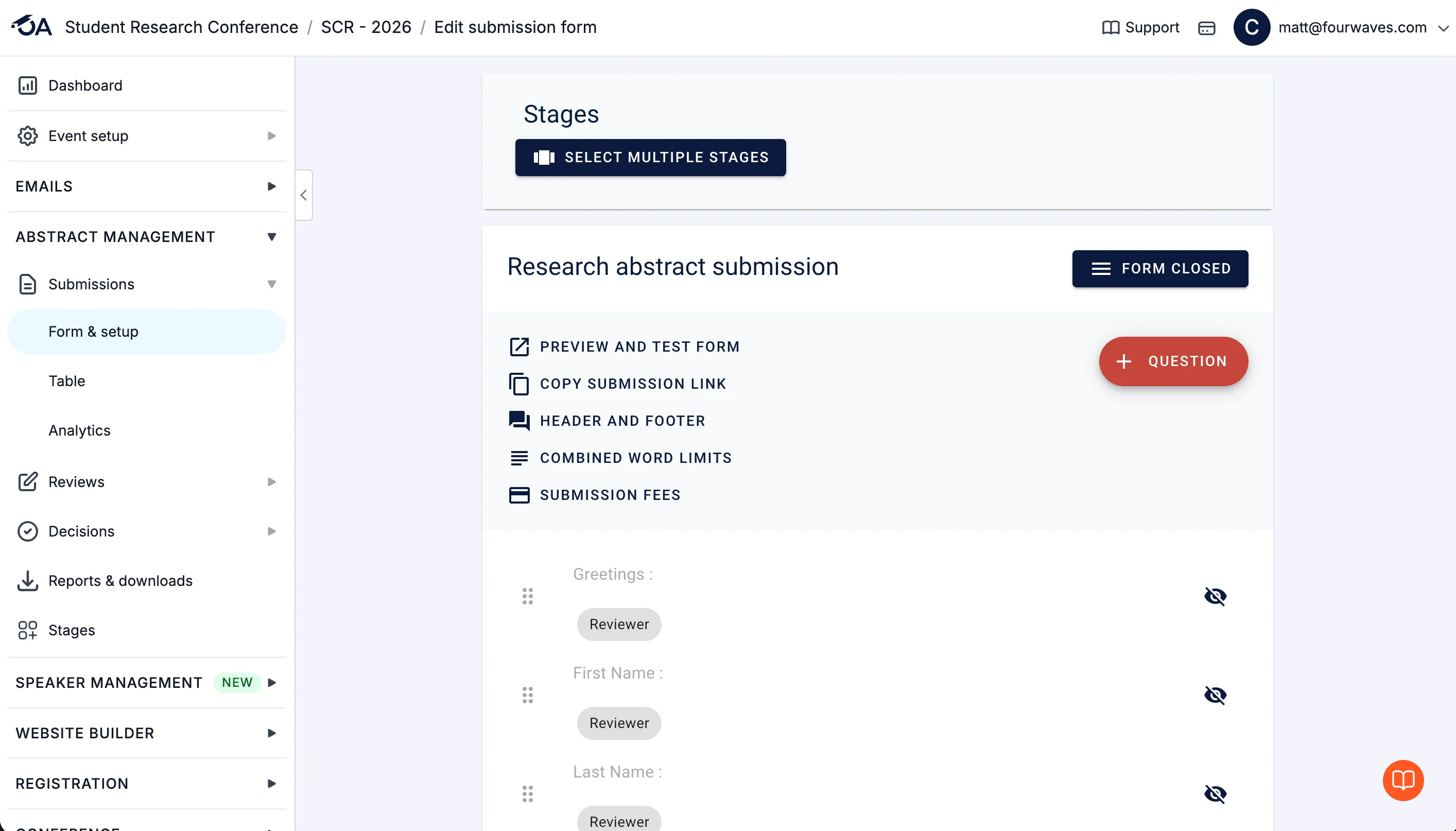
Oxford Abstracts allows you to customize the submission process.
Best for: Configurable academic abstract management
Oxford Abstracts, as its name implies, was built for abstracts management, which makes it a good overall solution. It offers flexible peer review options to keep things clear for reviewers while managing conflicts of interest and late reviews. It also has an interface that attendees can browse the day of the event that includes the full program.
Standout Features:
- Intuitive peer review assignment based on specialisms.
- Session submissions useful for symposiums.
- Customizable decision-making settings for submission status.
It is highly configurable, and while the interface has felt option-heavy in the past, the team has been improving it. I often hear organizers comparing Fourwaves also compare Oxford Abstracts. The reason is it targets a similar audience: academic and research conferences looking for an easy platform to set up.
One cool thing about it is the multi-stage feature (paid add-on). It allows you to set up the submission, peer-review and decision process in multiple steps. For example, you can set up an initial abstract submission with only specific questions, then pair this with a specific peer-review set of questions. Then those accepted can be brought to a 2nd stage (eg. Paper submissions), each with its own submission, review and decision settings.
It also features a “symposium” module (another paid add-on) allowing you to collect session submissions and their corresponding abstracts. It’s one of the best platforms I’ve seen doing this.
It also has the standard features you’d expect from an abstract submission software like setting up email templates, review scoring grid and useful data exports. For example, you can access a list of pre-canned abstract book formats like sorted by submission Id, sorted by program code or acceptance types. The only other platform I’ve seen do this is Fourwaves, where the abstract book is slightly more customizable: no pre-canned templates, you can choose your own fields for sorting and grouping and decide which fields are exported in the book of abstracts.
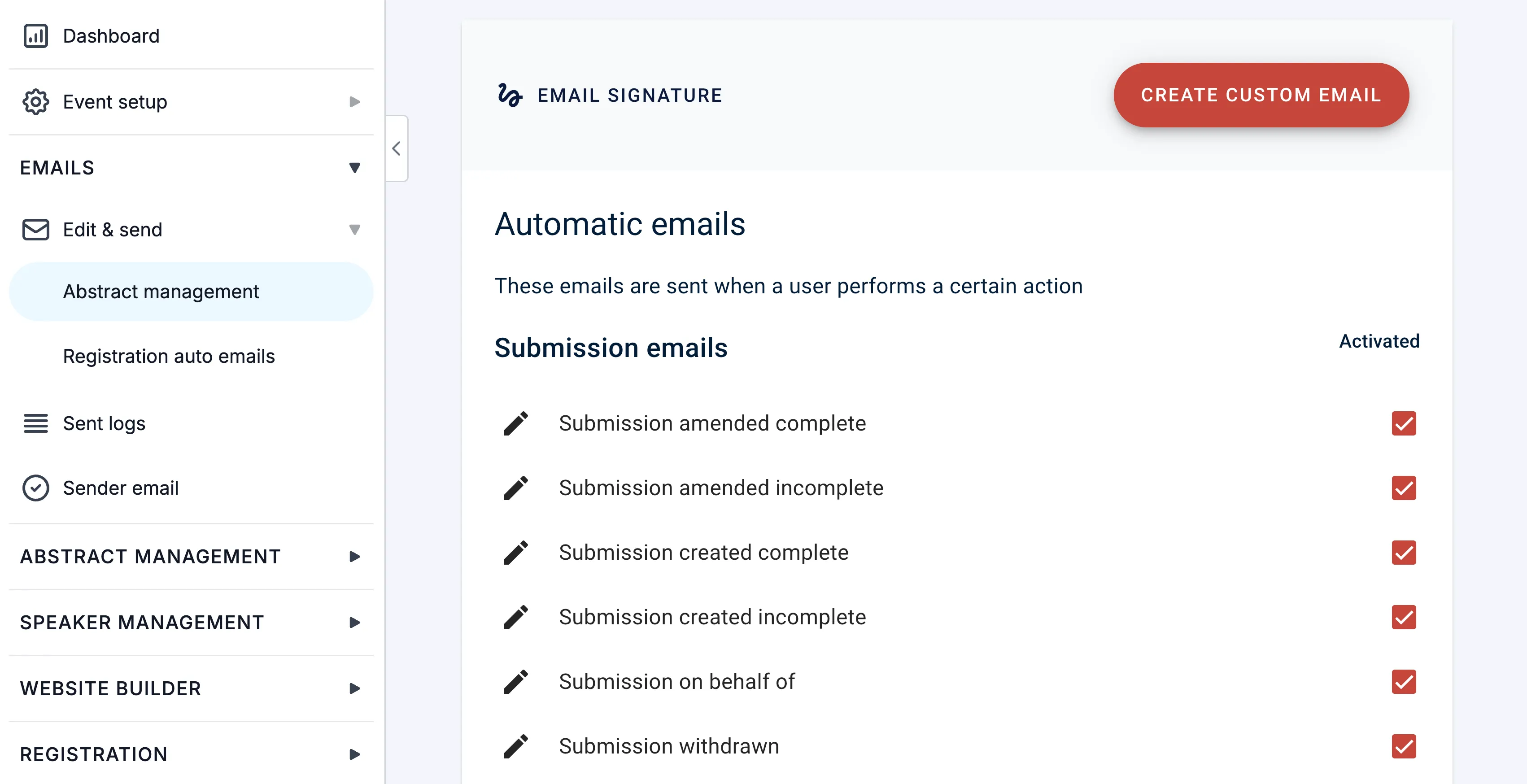
The email template section allows you to edit automatically sent emails and also create your own custom emails.
In July 2026, right as I was updating this comparison, they released a new feature allowing organizers to bulk upload their program from an Excel file.
Oxford is a powerful abstract submission software and the price is reasonable. When you include all the add-ons, the price tag can increase significantly, but it remains one of the most reasonable options, more affordable than Cvent, Cadmium or Ex Ordo. Our Oxford Abstracts alternative breaks down the comparison with Fourwaves.
9. Whova
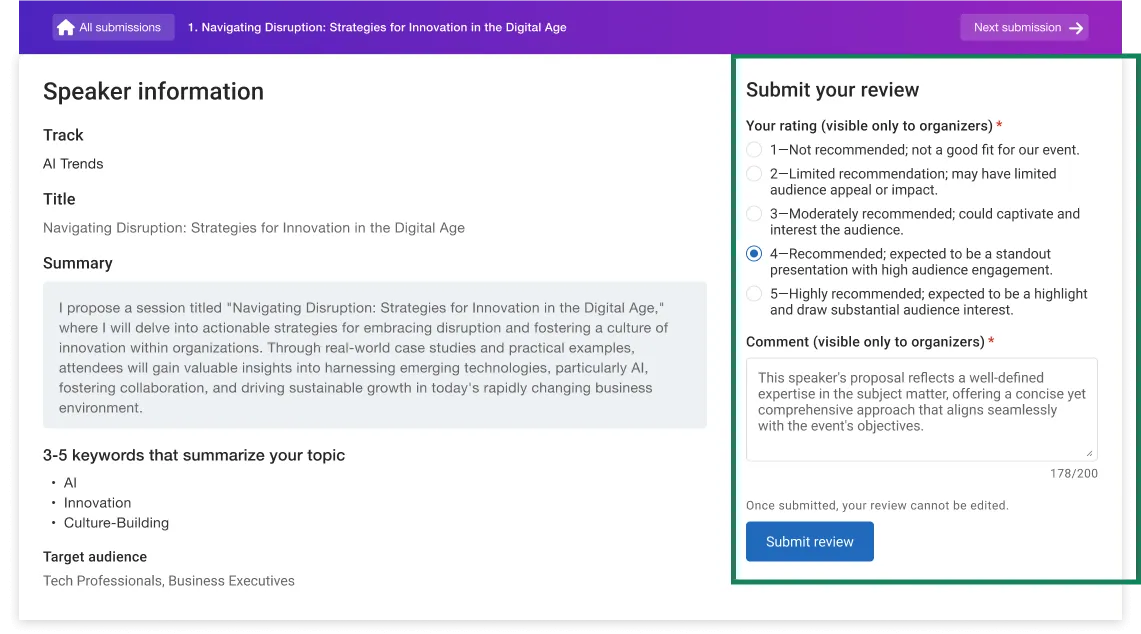
Whova’s review screen, with the proposal on the left and the rating form on the right.
Best for: An all-in-one event app that expanded into abstract management in 2025
Whova is a widely used event management app that added a call-for-speakers and abstract add-on recently. Organizers can collect submissions through customizable forms, assign reviewers, flag conflicts of interest, score with their custom criteria, and also track reviewer progress, then turn accepted submissions into agenda sessions for the event app.
Standout Features:
- Customizable submission forms for calls for speakers, papers, posters, and abstracts.
- Reviewer assignment with conflict-of-interest detection and customizable scoring rubrics.
- Accepted submissions convert directly into sessions for the agenda and event app.
Whova expanded into abstract management in 2025, and because it is still new to this space, organizers tell me it is not yet up to speed on flexibility and depth compared with dedicated tools, but they’re improving over time.
A first advantage is they have a lot of resources, FAQs and knowledge base articles. They also have the Whova academy with courses to help you learn the system. This will be necessary because for those who’ve used Whova like I did in the past, their interface can be overwhelming.
That being said, they offer all the features one would look for in abstract management: customizable forms, custom scoring rubrics, communication tools and an online program that transfers into Whova’s acclaimed mobile app. You can add custom questions to the submission form, like tracks, preferred presentation types.
One thing I like is the color-coded bars for each submission which indicate at a glance the review results. See the green bars in the screenshot from my dashboard below:
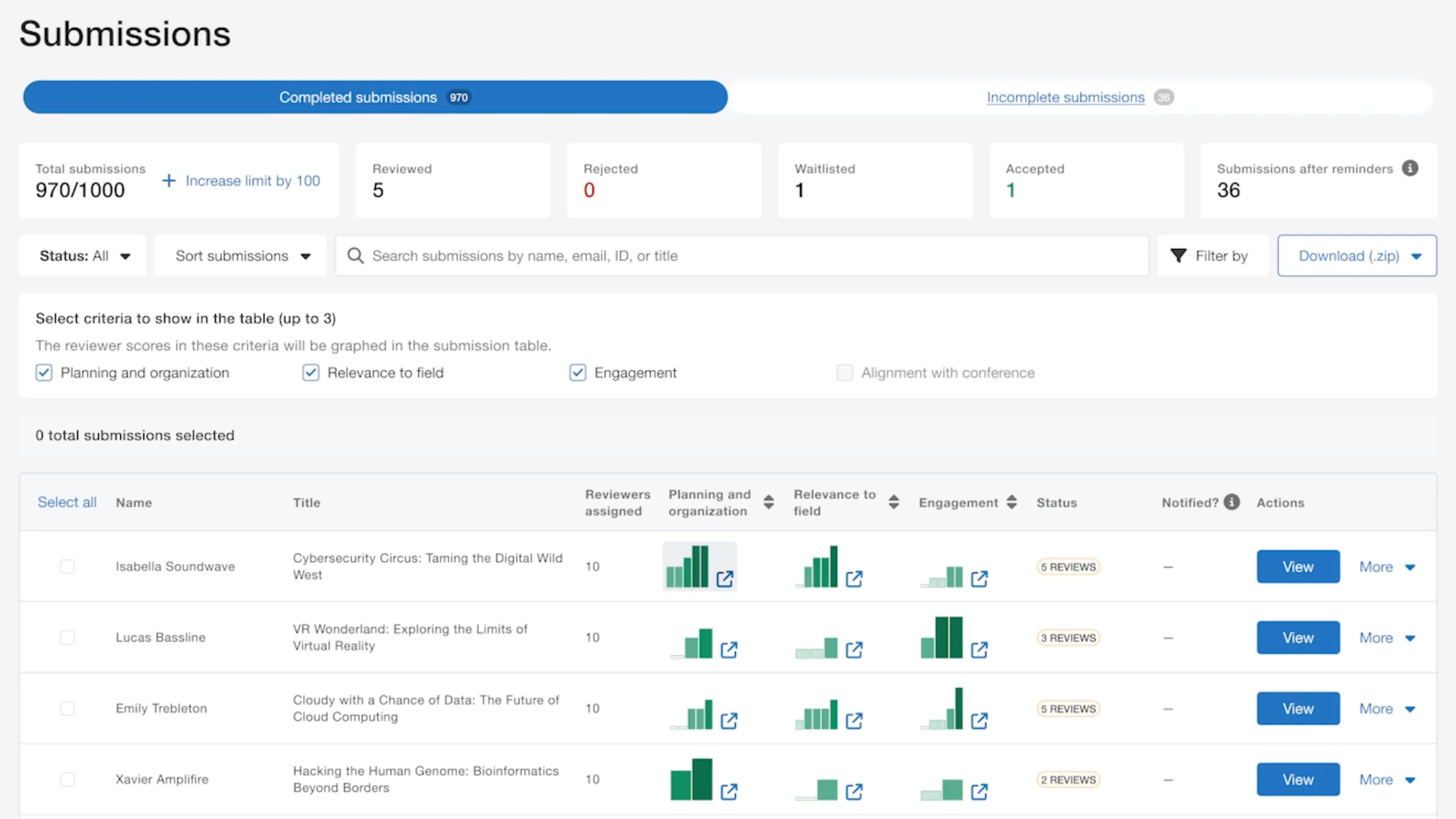
The submission dashboard with its filters and search bar allows you to see review results at a glance.
You have all the usual peer-review options like custom rubrics (that can go up to 10) and describe what each score means. One thing an organizer told me is that once a first review is completed, the rubrics cannot be edited, so make sure to have the final form ready before accepting reviews. You’re also able to determine which emails are sent to inform organizers of the review progress.
One thing it doesn’t have that Ex Ordo and Oxford Abstracts have is the session submissions capabilities. So you might want to look away from Whova if that’s something important to you.
You can make decisions and send bulk acceptance emails, including a link to the registration form and to the speaker center where files can be uploaded. You can customize different acceptance emails based on specific session types. Just like Fourwaves, Whova integrates really well with the registration module.
It sometimes lacks a bit of flexibility in moments where it’s most needed. For example, if you already added an accepted submission into the agenda, you cannot change the decision, you need to delete the synced session to the agenda and then mark it as rejected. Also you cannot control exactly the order in which accepted presentations appear in each session.
They also have a confirmation feature allowing speakers to confirm acceptance, which eliminates the need to send manual emails to hundreds of speakers.
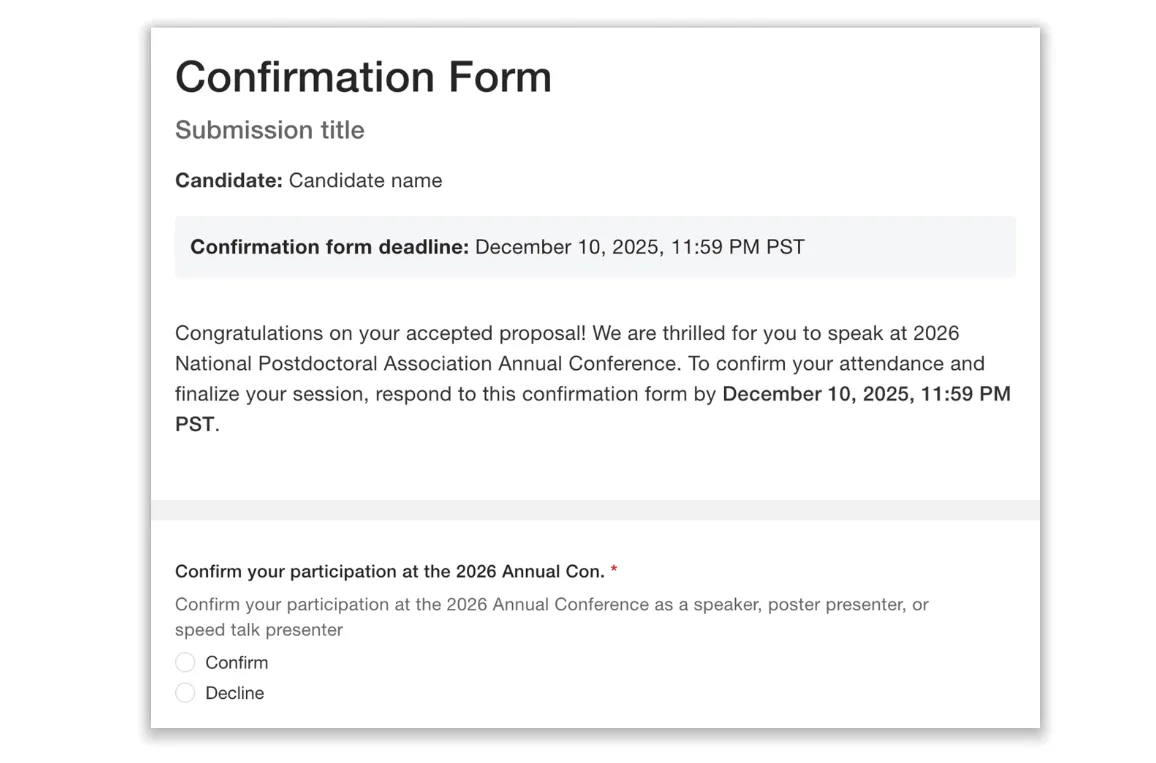
The presenter confirmation form is useful to capture speaker confirmations.
On cost, Whova does not publish prices. It quotes each event individually, with the package scaled to your attendee count and abstract management sold as a paid add-on. Several also told me their pricing climbed noticeably over the past year.
So I decided to verify the costs myself (July 2026) directly with Whova (hopefully this will save you time as you compare these platforms). Here are the different packages in USD:
- Standard ($1,199): up to 500 invitation emails, 200 submissions, and 3 external reviewers.
- Advanced ($2,099): up to 1,000 invitation emails, 500 submissions, and 20 external reviewers.
- Premium ($2,999): up to 2,000 invitation emails, 1,000 submissions, and 50 external reviewers.
- Enterprise ($3,999): up to 3,000 invitation emails, 2,000 submissions, and 150 external reviewers.
Whova, like many of the other options outlined in this article, is another good option for abstract management. What’s unique is its integration with a very good event mobile app that includes gamification and attendee engagement.
10. Cadmium (Abstract Scorecard)
Best for: Large associations already running events on the Cadmium suite
Cadmium offers abstract management through its Abstract Scorecard product which is part of the Eventscribe event technology suite. It contains the expected features: customizable submission forms, reviewer assignment by topic or expertise, scoring, and automated deadline reminders.
Standout Features:
- Reviewer assignment filtered by topic, track, or expertise.
- Automated, customizable deadline and reminder notifications.
- Native integrations with association management systems.
The setup is a bit different than what conference organizers are used to. It functions with a unique method, using “tasks”, that applicants need to follow. For example, a task can be “upload the abstract text”, “upload the presenter bio” or “complete the conflict of interest form”. This has the advantage to track the tasks completed by submitters and generally to break down the submission process into logical steps.
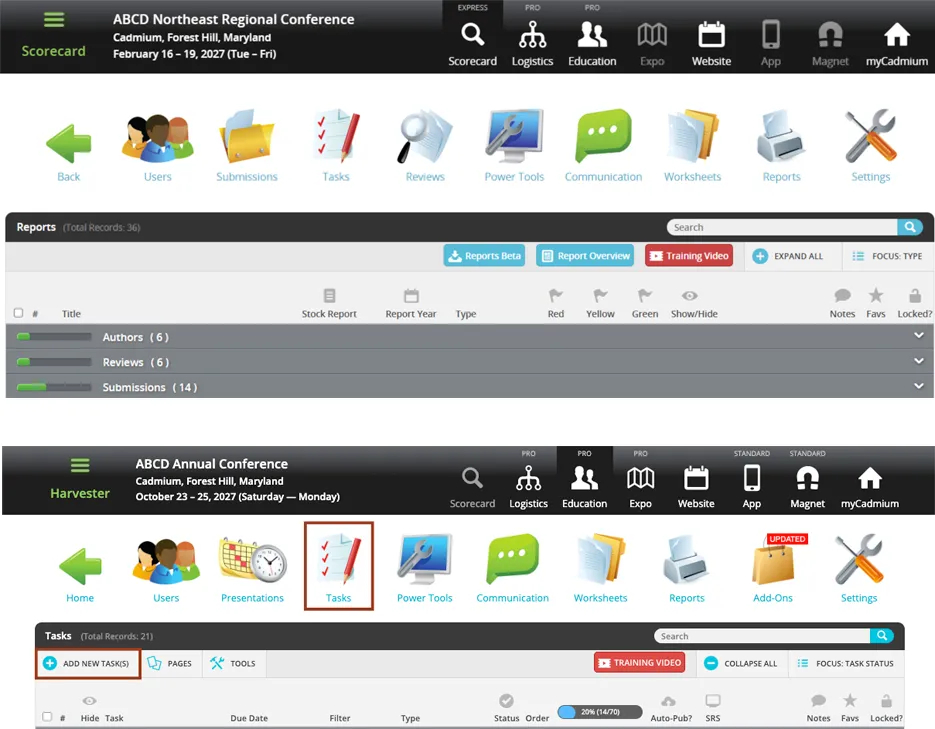
Top: The interface screenshots I took below resemble the Windows XP era. Bottom: The section where tasks can be configured.
They do have features most conference organizers are looking for. For example, blind review settings, a designated Chair role, which can make decisions based on reviewer scoring. They can also build sessions out of the accepted submissions and it includes a Speaker Management Portal which allows organizers to track the final documents required for each speaker, which is useful for chairs and for preparing the on-site experience.
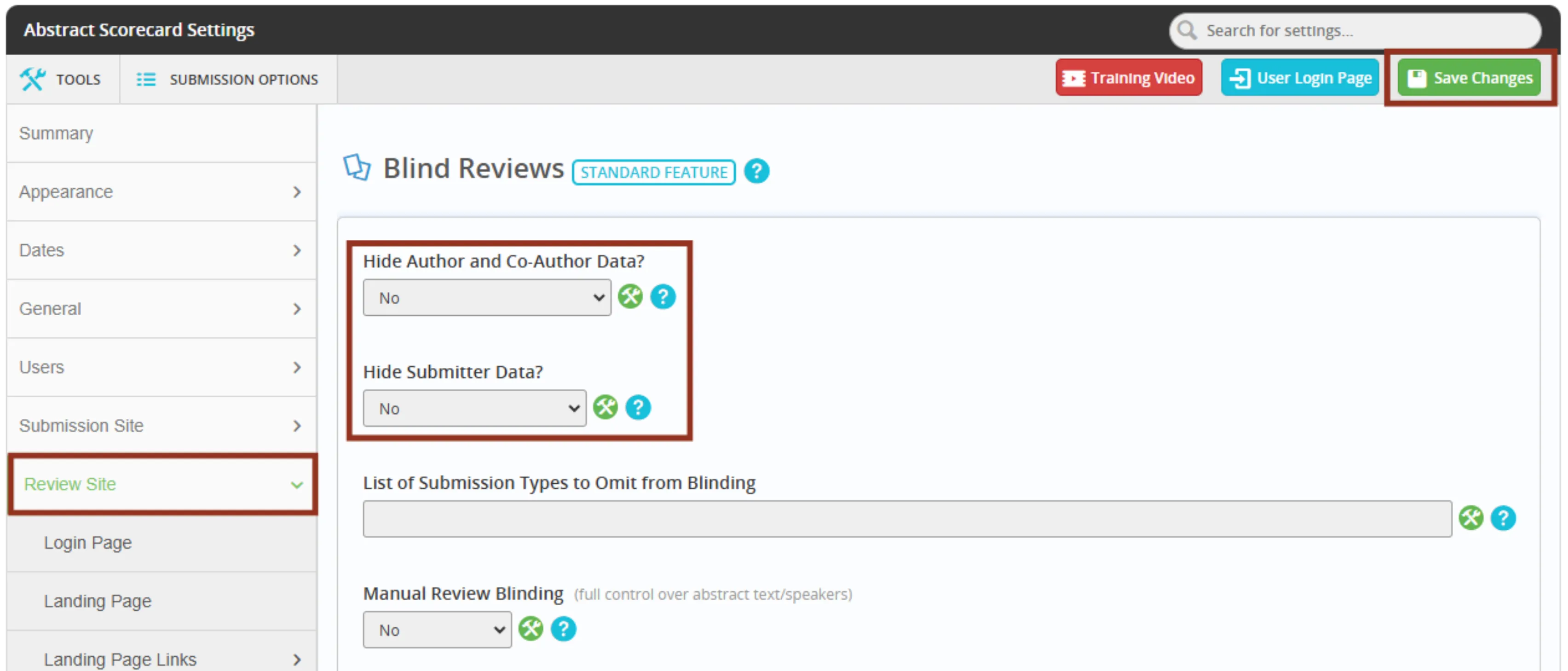
Settings allow you to hide author data or submitter data independently.
They have a built-in email communication system to keep all stakeholders up to date along the way. Also, it integrates with association management systems like iMIS and Fonteva (Salesforce).
Without a doubt, its natural home is the association world that requires speaker management or large events managed by PCOs. It’s well integrated into a suite of tools for the whole conference management lifecycle. If your organization already runs its annual meeting on Cadmium’s suite, adding Abstract Scorecard keeps everything with one vendor.
Pricing is quote only, but reports I had from organizers is it sits above $3,000 USD.
For a standalone research conference or if you’re looking for an easy to use, fast to set up option, it might not be ideal. An organizer I spoke with just last week described the setup process as an enterprise-style setup that is lengthy…
In conclusion
After being in the conference and software space for more than 15 years, I’ve learned that “best” software doesn’t exist in absolute terms. It’s always a question of trade-offs.
I’ve put together this honest and fair comparison of what I believe are the strongest options to help you decide, based on the trade-offs you’re willing to make.
If you’d like to explore how Fourwaves works you can create an event for free or book a demo with our sales team.
Abstract management software FAQ
The best abstract management software for academic conferences is Fourwaves, because it runs a full research review process in one platform: multi-track submission forms with conditional logic, single or double-blind peer review with field-level visibility, automatic reviewer assignment with conflict detection, workload caps and expertise matching, per-track sub-committees, and an automatically generated book of abstracts. Pricing is flat and published, with no per-registrant fee. EasyChair and Oxford Abstracts are strong academic alternatives, while Cvent suits large corporate events. The right choice depends on how deep your review process needs to be, your submission volume, and your event size.
Fourwaves, EasyChair, Ex Ordo and Oxford Abstracts all run abstract submission and peer review for academic conferences; the differences are what happens after acceptance and how you buy. Fourwaves adds registration and payments, a conference app, the event website and the program on the same event, publishes flat annual prices, includes a free plan with 25 submissions per year across your events, and keeps past events online indefinitely, so a committee can start with abstracts alone and add the rest at the next edition. Oxford Abstracts offers a paid symposium add-on for collecting symposia with their own sub-abstracts, prices per event, and guarantees event data access for one year (its pricing page, checked September 2026). Ex Ordo prices by quote after sales demos, collects panel and symposium submissions natively since January 2025, and syncs member status from Naylor Novi AMS, an association management system, on request, which suits associations that need that specific integration. EasyChair handles no payments and no event website. Detailed comparisons written by Fourwaves: Fourwaves vs EasyChair, Fourwaves vs Ex Ordo and the best Oxford Abstracts alternative.
Abstract management software ranges from free to several thousand dollars per event. Academic-focused tools like Fourwaves and Oxford Abstracts publish their plans and include free tiers, EasyChair charges per submission, and enterprise platforms such as Cvent, Ex Ordo, and OpenWater quote pricing based on event size. Watch for per-registrant fees, which can make a seemingly cheap platform expensive once attendance grows.
Fourwaves is the best free abstract submission software for an academic conference, because its free plan runs the whole workflow rather than the submission step alone. On the free plan you build the submission form yourself with conditional logic, send authors automatic confirmation emails, define your own presentation types (poster, oral, or any other), record a decision on each submission, and give unlimited administrators access to read and decide together, up to 25 submissions per year across your events.
The same free plan exports a formatted book of abstracts you can style, builds a conference program with sessions and nested presentations, publishes that program on a full event website, and carries it into the Fourwaves conference app.
No other free plan for academic conferences covers that much: Oxford Abstracts stops at abstracts and the program, EasyChair caps its free licence at 20 submissions and charges per submission above it, and Cvent, OpenWater and Ex Ordo have no free plan at all (competitor pricing pages checked September 2026, and set out in the best abstract management software comparison). A generic form builder such as Google Forms or Microsoft Forms collects abstracts and nothing else: no decisions, no book of abstracts, no program.
Disclosure: Fourwaves publishes that comparison and has an obvious stake in it. Every claim above is checkable on each vendor’s own pricing page.
Free tools often lack role-based permissions, automated reviewer assignment, multi-stage review or exports for proceedings or scheduling. They can be fine for very small calls for abstracts, but most conferences outgrow them due to limited number of submissions once volume and complexity increase.