

Best EasyChair alternatives for academic conferences (Updated July 2026)

Published on 19 Jun 2026 · Updated on 09 Sept 2026
EasyChair has run academic peer review for two decades, so most reviewers already have an account. But support is paid-only and the interface has barely changed in years.
It was also built for one job, collecting and reviewing papers, so registration, a website, and the attendee experience were never its focus.
If your conference has outgrown it, or you need the tooling modern conferences expect, with registrations, a mobile app and/or an event website in the same place, here are the best EasyChair alternatives, compared honestly and last updated in July 2026. The right EasyChair alternative depends on whether you need a full academic conference management platform or only a stronger submission system. In this guide, I’ll cover both.
Why organizers look for an EasyChair alternative
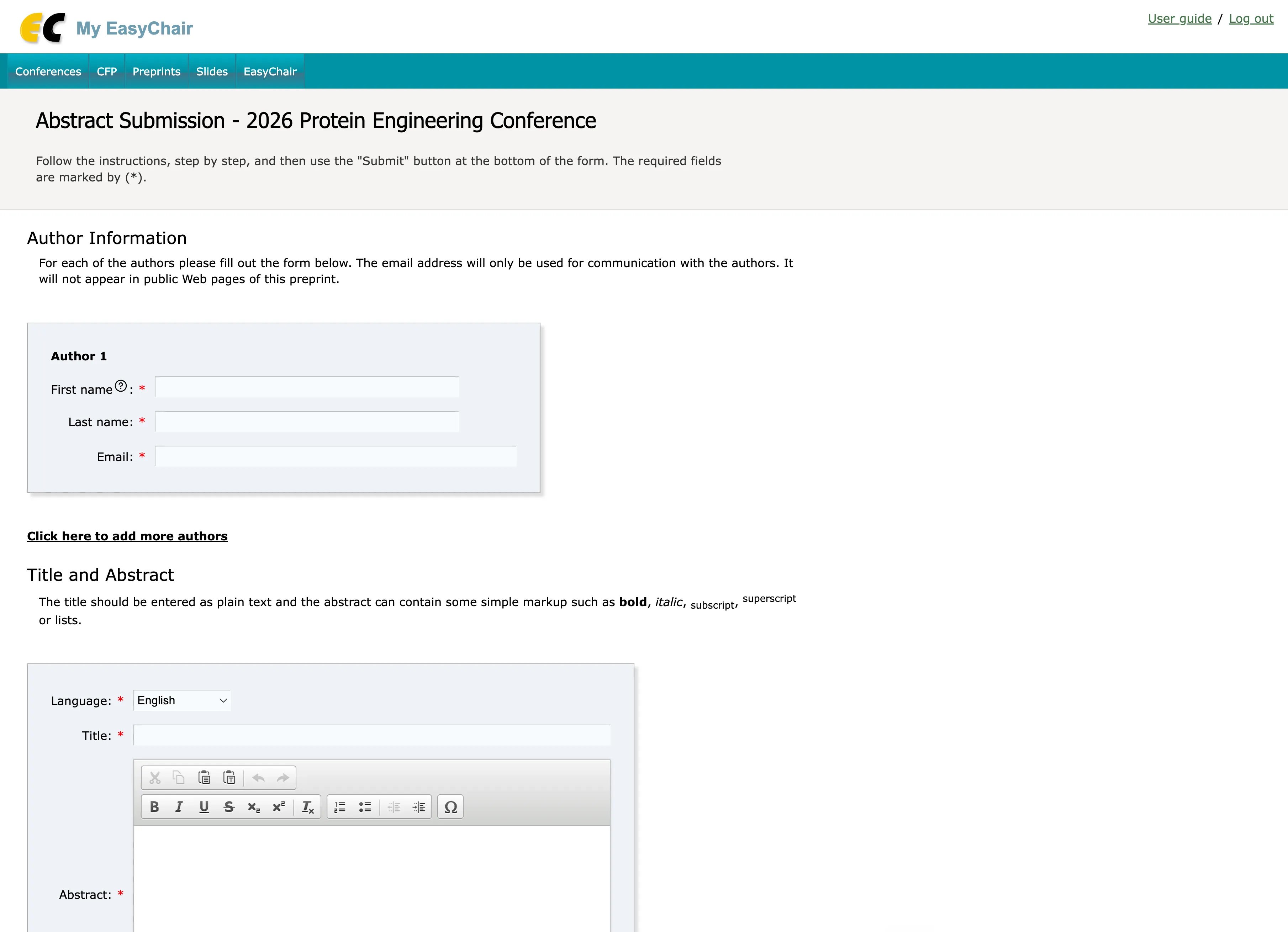
EasyChair’s abstract submission form in 2026, an interface that has barely changed in years
EasyChair is a reliable, familiar conference management system, and for a submission/review-only workflow it still does the job. I noticed conference organizers typically start looking for an EasyChair alternative when friction shows up as their events grow:
- It is built for submissions, but a conference is more than that. Collecting and reviewing papers is only part of the job. The point of most conferences is to put that work to use, which usually means a beautiful program, a mobile app, and often a registration system and an event website. That calls for a complete academic conference management platform in one system, not separate tools patched onto a submission system.
- The interface feels dated. An outdated interface is the most common complaint across review sites and competitor roundups: the workflows look and feel the way they did a decade ago.
- The cost adds up. EasyChair’s documentation still lists a free license for events under 20 submissions, but organizers regularly tell us that free option is no longer available in practice. Above that threshold, pricing is per submission (from around $3.90) and grows quickly for a recurring conference. Pavel Andreev, full professor of Business Analytics and Information Systems at the University of Ottawa’s Telfer School of Management, shared his numbers with me in July 2026: “I paid $1,399 Canadian for full support and unlimited functionality.” For the registration module, EasyChair suggested an additional $400 add-on with a 3.2% total transaction fee.
- Support is paid-only. Technical support does not come with the free license, so smaller conferences are on their own when something breaks.
If your conference is essentially a review process, none of this may bother you. EasyChair is good at reviewing content; it is just less suited to putting that content to work across the rest of your event.
When EasyChair is still the right choice
I want this comparison to be fair, so I have to say that EasyChair is hard to beat for large, review-heavy conferences in computer science and engineering. Its review workflow is deep, with paper bidding, conflict-of-interest handling, reviewer assignment, rebuttals, and discussion, plus double blind peer review and a camera-ready stage for accepted papers. It also serves journal manuscript management, from manuscript submission to decisions, a niche most conference platforms skip.
Authors and reviewers in those fields already know it, so there is little onboarding. If review depth is your only requirement and your community already lives on EasyChair, switching may not be worth it.
I gotta admit, EasyChair’s old-school interface, while old looking, makes me a little nostalgic for the good old days. There’s something reassuring about a tool that has barely even changed in 20 years.
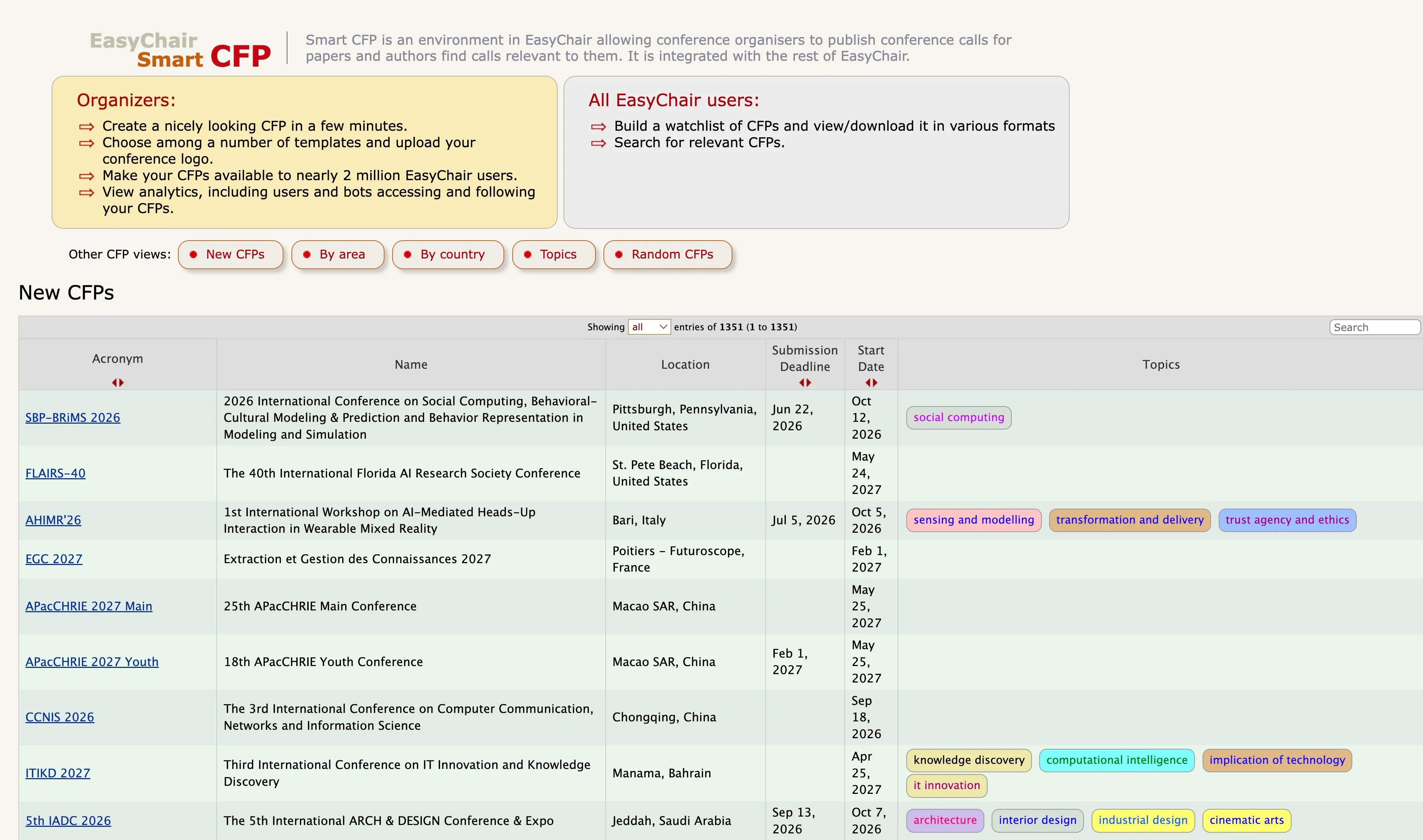
EasyChair’s Smart CFP directory, where organizers publish calls for papers to its large user base
Also, its CFP directory is an interesting aspect: with nearly 2M users, posting your call for papers there puts it in front of an academic audience that newer platforms can hardly match.
The alternatives below matter most when your needs go beyond peer review.
What to look for in an alternative
Not every tool on this list does the same job. Before you compare names, decide which key features you need:
- Scope. Do you need a full event lifecycle (website, registration, payments, abstracts, program, virtual sessions), or only submission and peer review?
- Review depth and decision management. For review-heavy events, the platform should handle double-blind review, conflict-of-interest detection, paper bidding, automated reviewer assignment, and a camera-ready or proceedings export. Smaller events rarely need any of this.
- Submission management. Customizable forms and customizable workflows determine how much of the process is handled automatically rather than by hand.
- Data migration. How easily your submissions, authors, and reviewer list move over from EasyChair. Do you need an API or integrations?
- Pricing model. Free plan, per-submission, per-event, or quote-only. Transparency varies a lot.
- Registration and payments. Several tools handle abstracts but not registration.
- Modern, self-serve setup. Can your team configure it without a vendor doing it for you?
- Support. Free tiers often come with none.
EasyChair alternatives at a glance
Here is how the main options compare. “Limited” means the tool offers a basic version of that capability rather than a full one.
| Tool | Free | Abstracts & peer review | Registration & payments | Mobile app | Pricing model |
| EasyChair | No | Yes (deep) | Yes | No | Per submission (from ~$3.90) |
| Fourwaves | Yes | Yes | Yes | Yes | Free plan; pay on usage |
| ConfTool | Yes | Yes | Yes (Pro) | Yes | Free / quote (Pro) |
| Ex Ordo | No | Yes | Yes | Via integration | Quote-based |
| Oxford Abstracts | Yes | Yes (strong) | Yes | No | Free; per event $890–$3,450 (USD) |
| Microsoft CMT | Yes | Yes | No | No | Free (academic only) |
| OpenReview | Yes | Yes (open review) | No | No | Free |
The rest of this article walks through each tool, starting with the one I work on so I can be specific about what an all-in-one platform looks like.
1. Fourwaves
Fourwaves covers the whole event in one place instead of only the submission step, and it is built for research and academic communities, so the workflows match how conferences run.
The interface is modern and easy to use with a small learning curve, and it strikes a good balance between flexibility and ease of use. Here is what it handles.
Abstract management
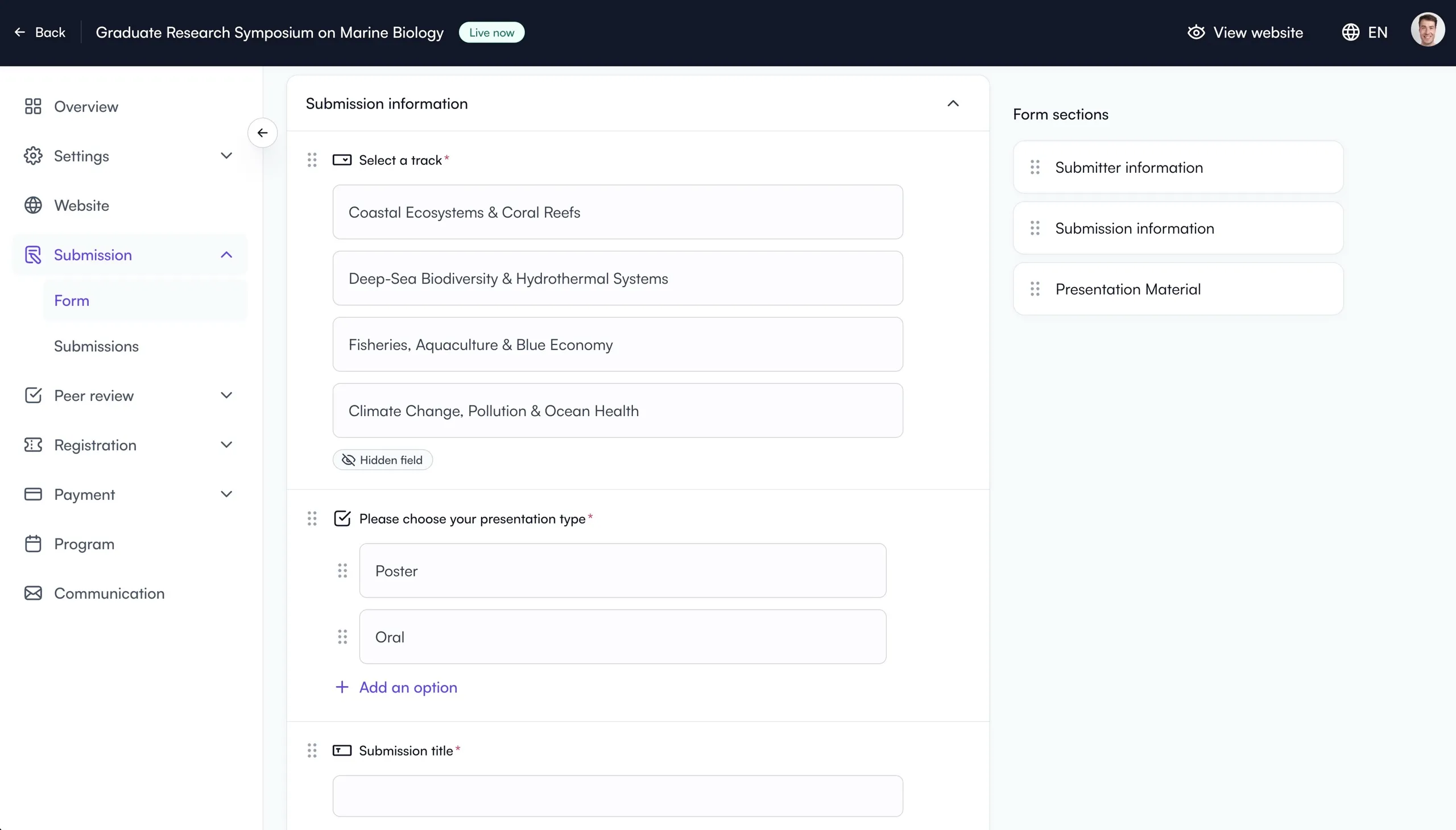
Fourwaves’ abstract management tool
The submission form comes pre-built for a fast setup with custom fields like submission title, authors, abstract and more. Organizers can easily add any number of fields, including the event tracks, a presentation type preference question, as well as specific fields which can be edited upon acceptance, like full paper PDF, poster file, PowerPoint file and more.
Authors submit their work through a form you control, with the fields and file types you need. You can read more in my breakdown of the best abstract management software.
Peer review management
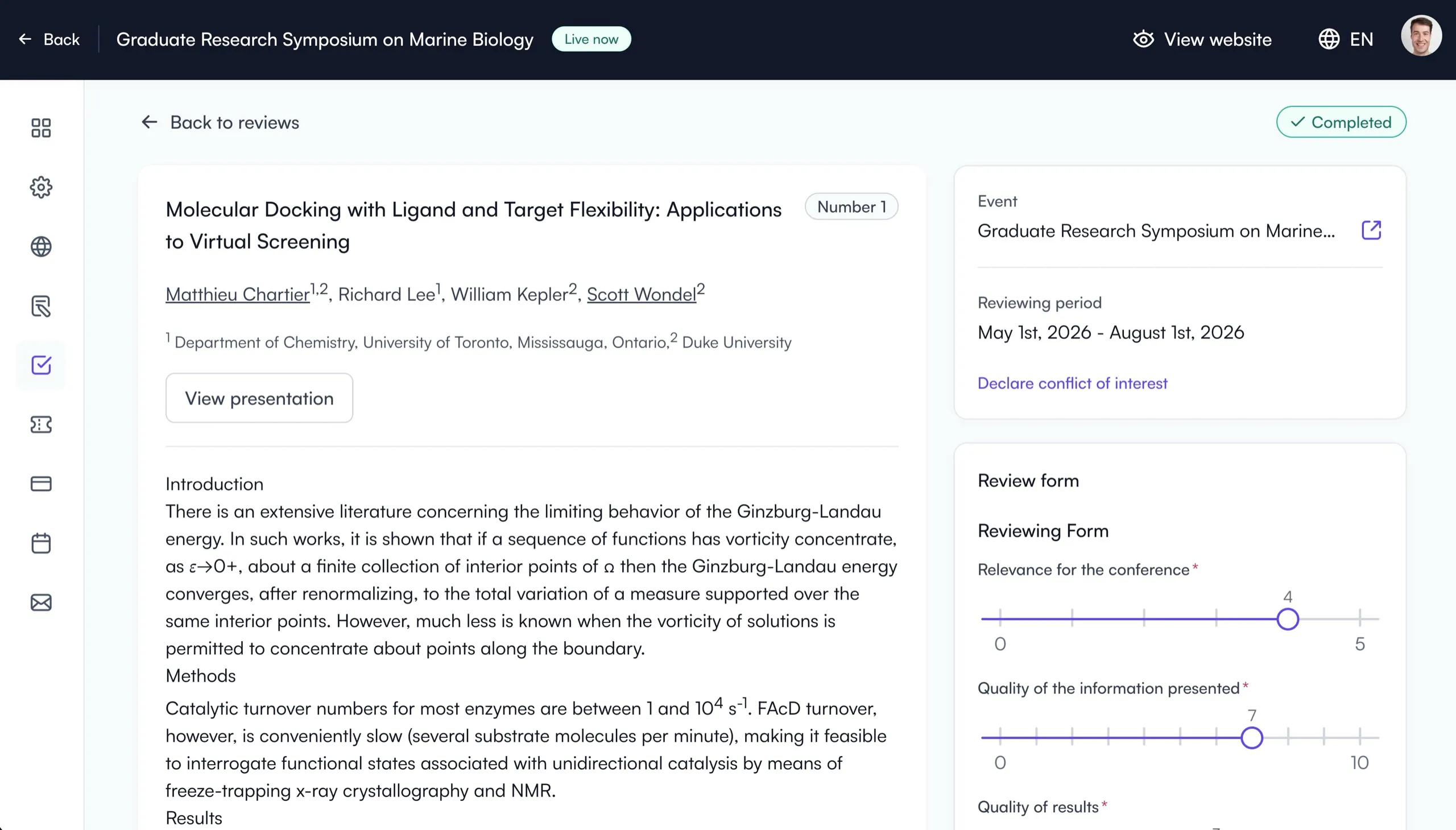
Fourwaves’ peer-review tool
Reviewers score and comment directly in the platform, and reviewer assignment can be handled automatically or done by hand, with bulk or personalized emails and review progress tracking. It does have limits: for example, authors cannot reply to reviewer comments individually in text, though they can address the feedback by revising their submission, and Fourwaves does not handle indexing in platforms like Scopus directly.
The modern interface is praised by reviewers who can easily login and complete their assignments, helping organizers meet their deadlines.
Event website and registration
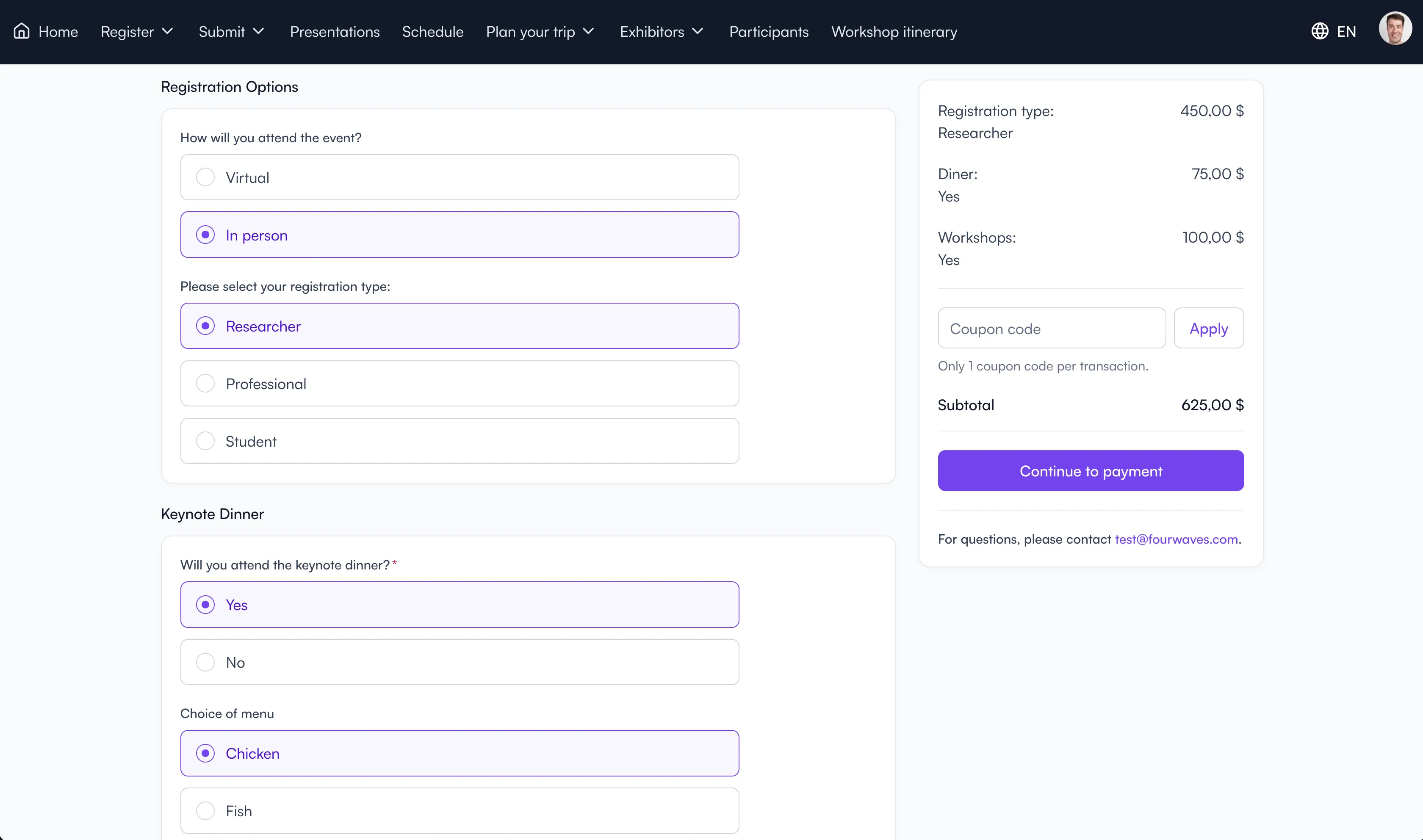
Fourwaves’ event registration options
Every plan includes a customizable event website where participants can find all the information about the event. It also contains a powerful registration module where presenters and attendees can register and pay.
You can publish the accepted abstracts in a full program that attendees can browse and which is accessible through a mobile app included for free.
On the registration side you can:
- set early bird and regular rates, with different prices for each registration type
- create coupon codes to comp invited speakers
- generate name tags and certificates of attendance from the registration data
Pricing: unlike EasyChair, there is no per-submission fee. Fourwaves has a free plan (only charges a service fee on credit card transactions). See the pricing page for the current details.
Best for: academic and research conferences that want submissions, registration, website, and virtual sessions in one self-serve platform.
Less ideal if: you only need peer review and nothing else, where a free review-only tool may be enough.
Fourwaves is the all-in-one conference management tool you have been looking for.
2. ConfTool
ConfTool is a German platform, which makes it a strong choice for European organizers who want support in their own time zone. It comes in two versions: a free, self-hosted Standard edition for small non-commercial events, and the paid, hosted ConfTool Pro for larger, multi-track conferences.
Where it shines is abstract submission and the review process, which is exactly what matters most when you are leaving EasyChair. It is genuinely powerful here:
- You can set up multiple tracks, each with its own track chair role, plus a Program Chair committee role for fine-grained permission control.
- Reviewers can bid on the submissions they want to review, which makes assigning reviewers much easier. This is the kind of feature EasyChair users specifically look for.
- The abstract booklet, conference program, and camera-ready proceedings exports are very good, including parallel sessions, which are notoriously hard and time-consuming to format by hand.
For events that collect registrations, ConfTool charges no service fees on credit card transactions, a real plus for budget-conscious organizers.
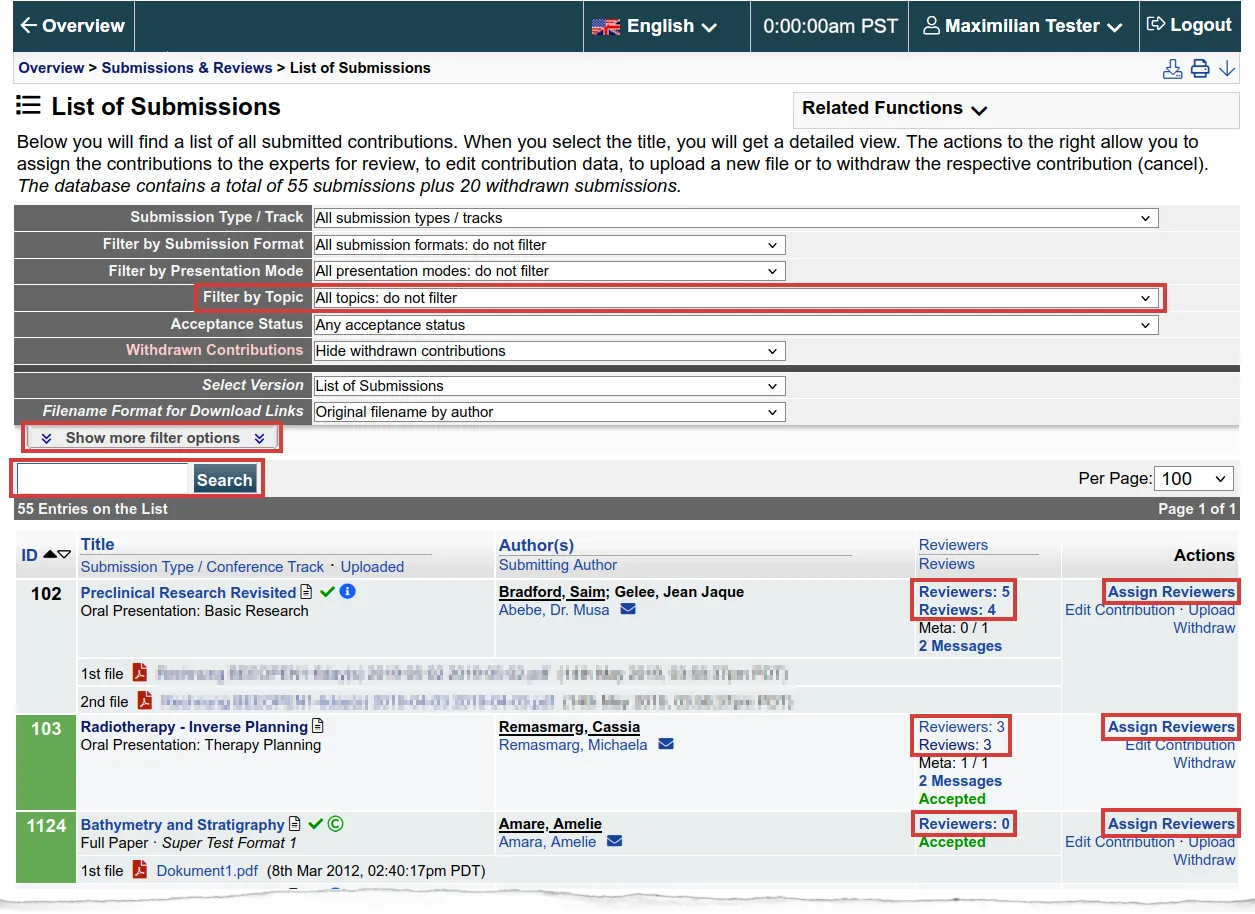
ConfTool’s submission list and filters, showing its older interface
The main downside is the interface. It is genuinely old, with many pages and sections packed with dense text, the support documentation is hard to navigate, and the initial setup is not intuitive. If you can get past that learning curve, it is a powerful and capable EasyChair alternative for submissions and peer review.
Pricing: Standard is free (self-hosted); Pro is quote-based. I heard from organizers they charge no service fee on credit card transactions, which is useful to know if you collect a submission fee.
Best for: budget-conscious or European academic organizers who want deep abstract and review features and do not mind a dated, complex interface. I know it’s approved at McGill University (where Fourwaves is also approved), so it can cater to a Canadian audience too.
3. Ex Ordo
Ex Ordo is a conference management platform aimed at scholarly societies, and it is UK-based, which helps with support if you are in a European time zone.
Ex Ordo started as an abstract submission system and added modules over time. Because the all-in-one vision was not there from the beginning, some of the later modules can feel less tightly connected than on a platform designed that way from the start.
The abstract submission and peer-review side is genuinely strong. For example, it also handles panel submissions, a dedicated way to collect panel proposals that can later be placed into the program.
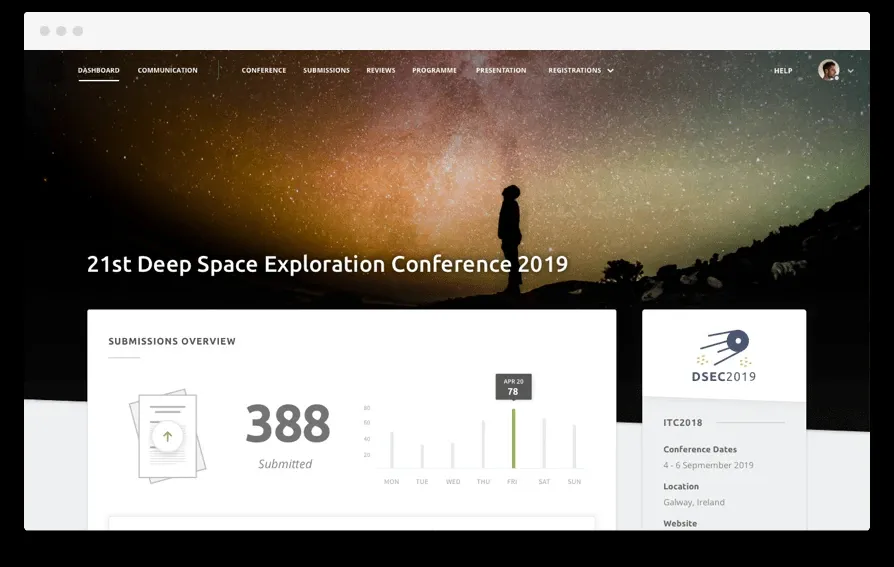
Ex Ordo’s organizer dashboard
Ex Ordo’s core business is very large conferences with an abstract-publishing component, so its registration side has had less attention than submission and review. For big events, small details in the registration flow can matter, but if you are coming from EasyChair you probably care most about submission and review, which is where Ex Ordo is strongest.
Ex Ordo offers a mobile app as a paid add-on through a Guidebook integration, at about $3,500 USD per event on a quote we received, aimed at large scholarly societies.
The submission setup can be a little rigid: you cannot always change field types or the exact order shown to submitters, so some setups need workarounds. That cuts both ways, since fewer choices means you can be up and running faster. You are trading flexibility for a smaller learning curve.
Pricing: quote-based, with no public numbers and no free tier.
Best for: scholarly societies running large, review-heavy conferences that want a strong, quick-to-launch submission and review system.
4. Oxford Abstracts
Oxford Abstracts is an abstract management and review platform that has grown to add registration, payments, and basic program scheduling, so conference schedules can be built without another tool. Submitters generally find the submission experience straightforward, and it is well rated for abstract handling.
It supports multi-stage submissions, so an event can collect an abstract first and a full paper later. Organizers control exactly what each stage requires through the form builder.
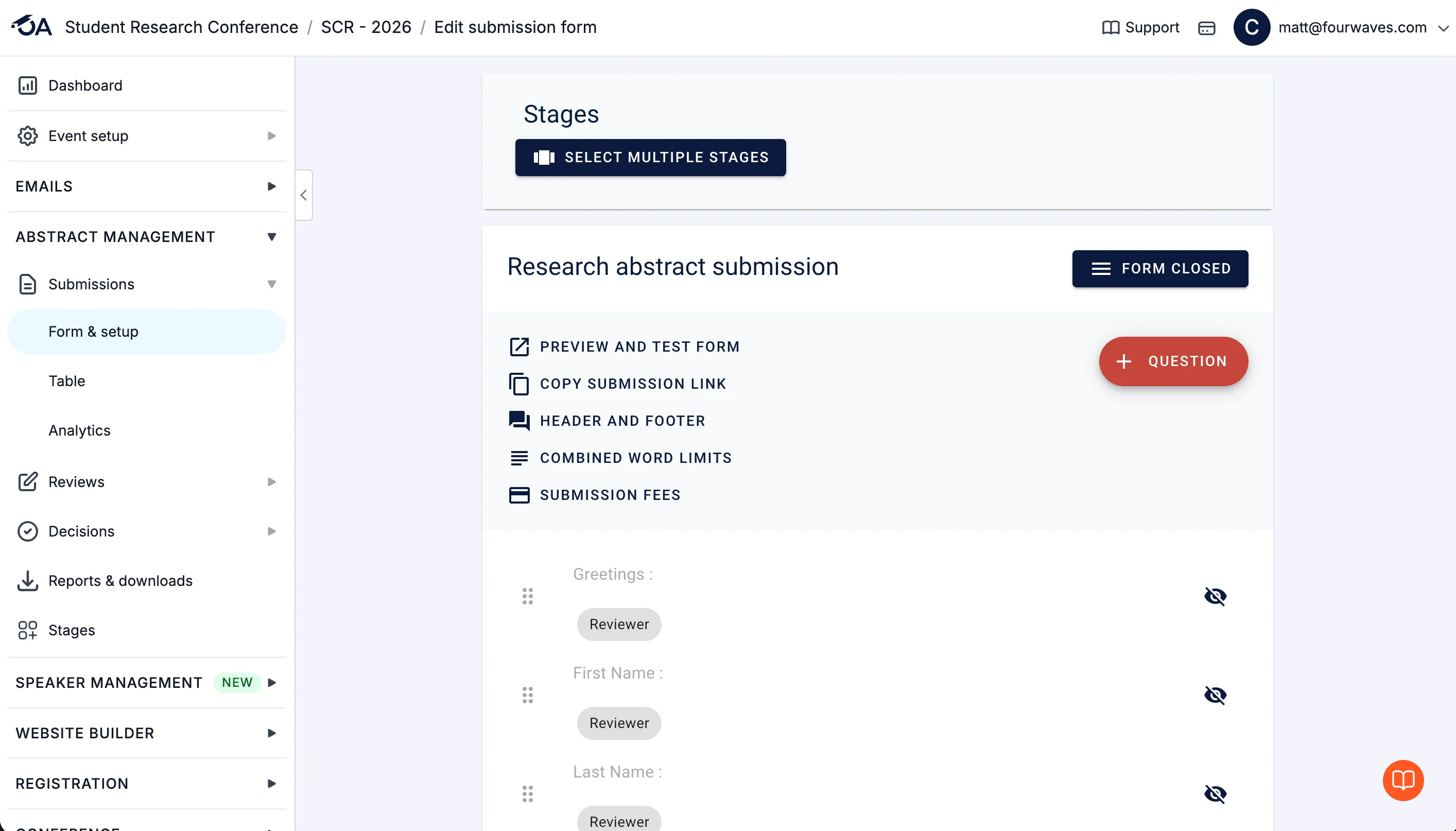
Oxford Abstracts’ form builder with multiple submission stages
It also has a session submission module for collecting session proposals and controlling who can submit to specific sessions through a private or public link. This comes as a paid add-on called Symposium.
Organizers can turn the platform’s automatic emails on or off and customize their content, which makes author and attendee communications easy to manage.
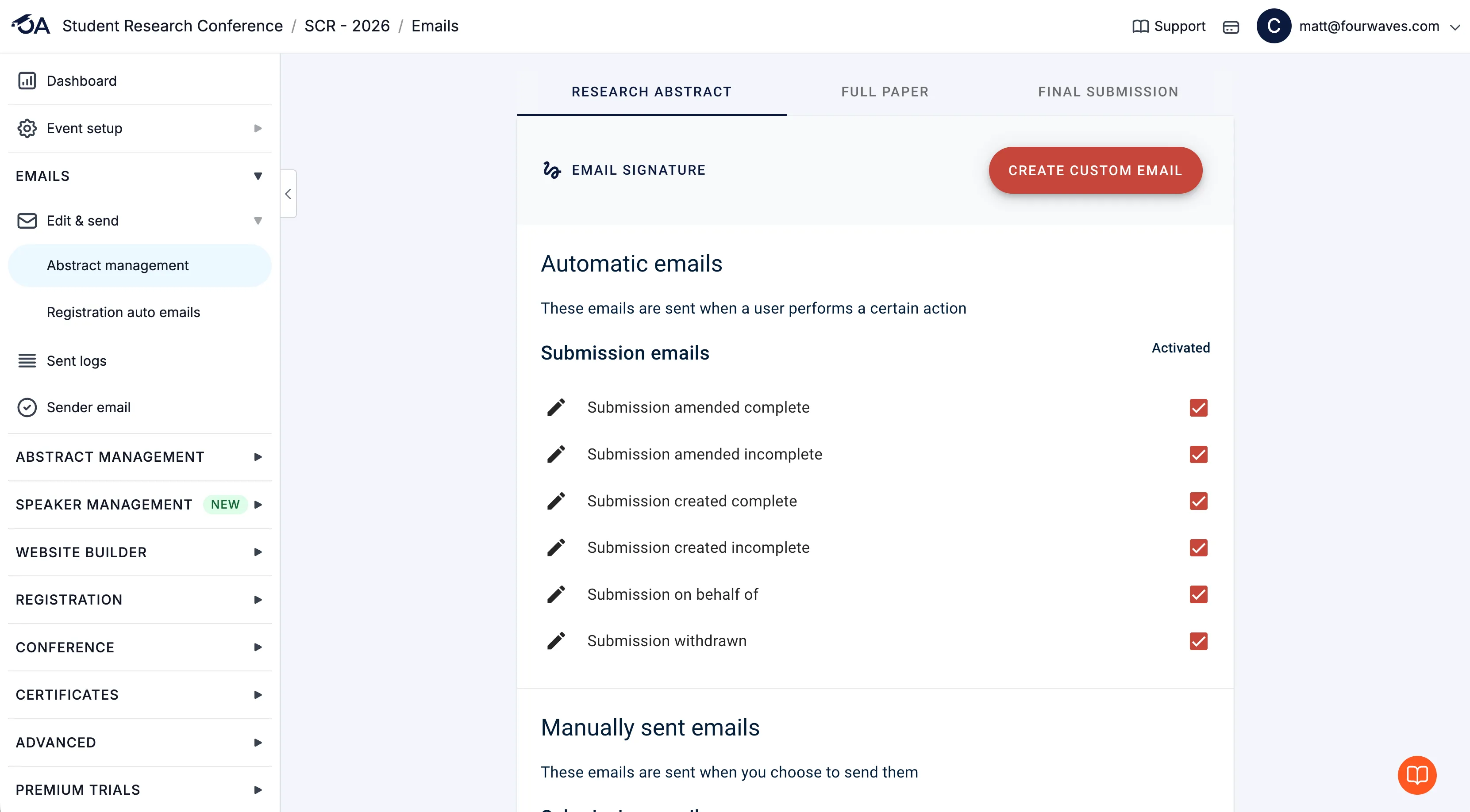
Oxford Abstracts’ automatic email settings, with toggles to activate and edit each email
Unlike EasyChair, Oxford Abstracts brings strong customization for abstract submissions and review, in a modern interface.
Pricing (USD): a free Basic plan for small events, then Abstract Management at $890, Standard Conference at $2,290, and Professional Conference at $3,450, each billed per event (updated July 2026).
Worth knowing: for years, organizers told us the interface could feel confusing, with a lot of options and a real learning curve, which is not what people want when they are leaving EasyChair. I regularly log in to check and noticed they improved over time. Support is a strong point, especially for organizers in Europe, since the company is UK-based.
Best for: abstract-led conferences that want strong submission and review workflows, multi-stage submissions, and responsive support.
5. Microsoft CMT
Microsoft CMT (Conference Management Toolkit) is free and backed by Microsoft Research, which makes it one of the strongest options if you only need submission management and review. It is widely used across computer science conferences.
Like EasyChair and ConfTool, reviewers and meta-reviewers can bid on the papers they want to review. Program chairs get a discussion thread and can meet virtually to talk through decisions. There is also a streamlined IEEE e-copyright submission flow, which helps when you need to export submissions to IEEE. CMT also supports double-blind review and a camera-ready phase, the standard workflow at most computer-science conferences.
One standout feature is reviewer assignment through the Toronto Paper Matching System (TPMS). TPMS builds a profile for each reviewer from a list of their publications, then scores how well each paper matches. Since many EasyChair users come from technical conferences, this kind of automated matching can save a lot of manual assignment work.
CMT also supports multiple tracks with no limit, so you can configure separate tracks for a large, multi-track international conference. You can read more on the Microsoft CMT overview.
Limitations: it does only submission and review. There is no registration, no payments, and no event website, the interface is dated, and use is restricted to academic institutions.
Pricing: free (academic use only).
Best for: technical and academic conferences that need powerful review workflows at no cost and handle registration elsewhere.
6. OpenReview
OpenReview is a free, nonprofit platform built for transparent, open peer review. It powers major conferences like NeurIPS, which makes it another strong contender if you specifically want a submission and review system and nothing else.
Its mission is to make the peer-review process more open, while still addressing the legitimate privacy concerns that come with conference peer review. One feature academics like is that discussion about a paper can continue after acceptance, which helps researchers connect and keep useful conversations going.
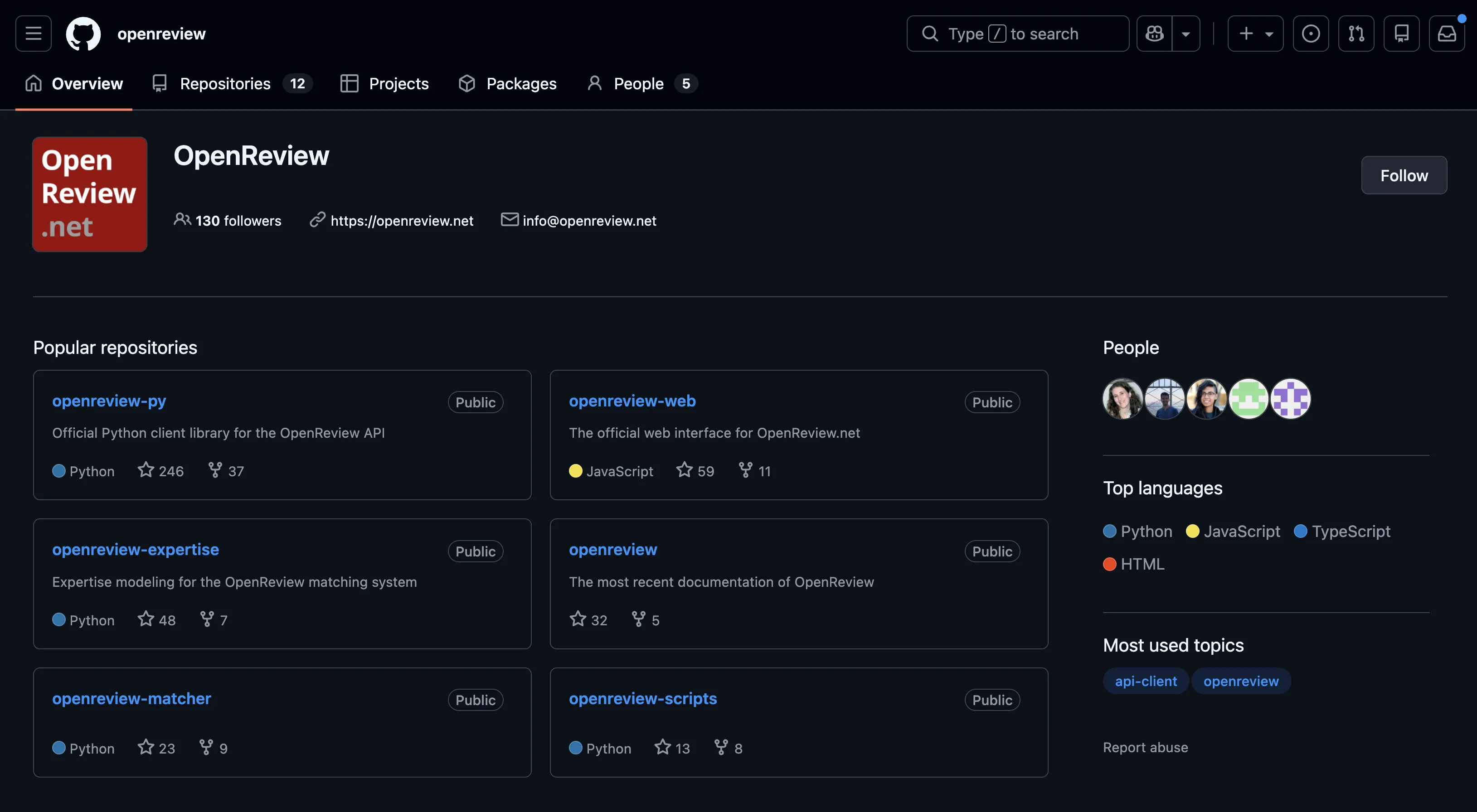
OpenReview is open source on GitHub
Limitations: it is narrow by design. There is no registration, payments, website, or scheduling, and it takes technical configuration to run.
Pricing: free.
Best for: conferences that specifically want open or experimental peer-review models.
How to migrate from EasyChair
Switching to an EasyChair alternative is less work than it looks, and data migration is mostly a CSV exercise: export your submissions, author data, and reviewer list from EasyChair, then import them into your new platform during setup (if you want to keep historical data). Otherwise it’s just a matter of adding the submission and peer-review form fields and settings which is relatively straightforward in modern platforms. Smaller conferences can complete the move in under an hour. Most teams move at the start of a new conference cycle rather than mid-review, which keeps the timeline clean. If you go with Fourwaves, the team can help set up your website, forms, and reviewer assignments so you are not starting from a blank page. My guide to organizing an academic conference covers the rest of the setup.
Which EasyChair alternative is right for you?
For modern conferences the choice usually comes down to scope:
- You need everything in one place (website, registration, abstracts, program, virtual): Fourwaves or Ex Ordo. Fourwaves has a free plan and transparent pricing; Ex Ordo is quote-only.
- Abstracts and review come first, registration second: Fourwaves or Oxford Abstracts.
- You want a free option and can self-host: ConfTool Standard.
- You only need peer review, for free: Microsoft CMT, or OpenReview for open review.
If you want submissions, registration, and a conference website without paying per submission or waiting on a quote, book a demo and I will show you how Fourwaves handles it.
EasyChair alternatives - FAQs
EasyChair’s documentation still lists a free license for events with up to 20 submissions, but many organizers tell us that free plan is no longer available in practice, so the public pricing information looks out of date. Above that threshold, EasyChair charges per submission, starting around $3.90 and rising for larger or premium tiers. For a recurring or mid-sized conference the cost adds up, which is why many organizers compare it against platforms with a genuine free plan or a flat per-event price.
EasyChair now offers a registration module that collects payments in several currencies. It sits separately from the submission system, so registration, the event website, and submissions are not managed as one connected workflow. If you want them in one self-serve place, an all-in-one platform is usually simpler.
Organizers usually switch from EasyChair because of its dated interface, per-submission costs that grow with the event, and a free plan that many tell us is no longer available. EasyChair is strong for peer review but was built around submissions, so registration, the event website, and the attendee experience can feel bolted on. Teams that run registration, a public website, and submissions together tend to prefer an all-in-one platform.
Fourwaves offers a free plan that only charges when you collect paid registrations through credit card transactions, so you can run an event website, abstract submissions, and peer review at no cost. Microsoft CMT is also completely free but covers only submission and peer review, with no registration or event website. ConfTool has a free self-hosted Standard edition for small non-commercial events, though it includes no support.
Fourwaves, Ex Ordo, Oxford Abstracts, and ConfTool Pro all handle attendee registration and payments alongside abstract management. Fourwaves and Ex Ordo cover the full event lifecycle, including a public event website and virtual or poster sessions. Microsoft CMT and OpenReview do not handle registration or payments, since they are built only for submission and peer review.
If you only need submission and peer review, Microsoft CMT and OpenReview are the strongest free options. Microsoft CMT is free for academic conferences and widely used in computer science, while OpenReview specializes in transparent, open peer review and powers major machine learning conferences. Neither handles registration, payments, or event websites, so choose them only when peer review is your single requirement.
Fourwaves is an all-in-one platform that combines abstract management, peer review, registration, payments, an event website, a mobile app, and virtual or poster sessions, while EasyChair focuses mainly on submission and peer review. Both run deep review workflows: Fourwaves handles single or double-blind review with field-level visibility, automatic reviewer assignment with conflict detection, workload caps, expertise matching, and per-track sub-committees. EasyChair is the better fit if your program committee specifically needs reviewer bidding or wants to publish its call for papers on the EasyChair database. On pricing, Fourwaves is flat and published with a free plan, whereas EasyChair charges per submission and organizers tell us its free tier is no longer offered.
To migrate from EasyChair, export your submissions, author data, and reviewer list as CSV files, then import them into your new platform when you set up the event. Most teams move at the start of a new conference cycle rather than mid-review, so the timeline stays clean. The Fourwaves team can help you set up your event website, submission forms, and reviewer assignments so the switch is quick.