

































Create your event Book a demo Sign in

A smarter way to build your conference program

Publish a detailed program that attendees will love, no more messy spreadsheets or last-minute chaos.

Trusted by top organizations

Ditch the spreadsheets and build your conference program with ease.

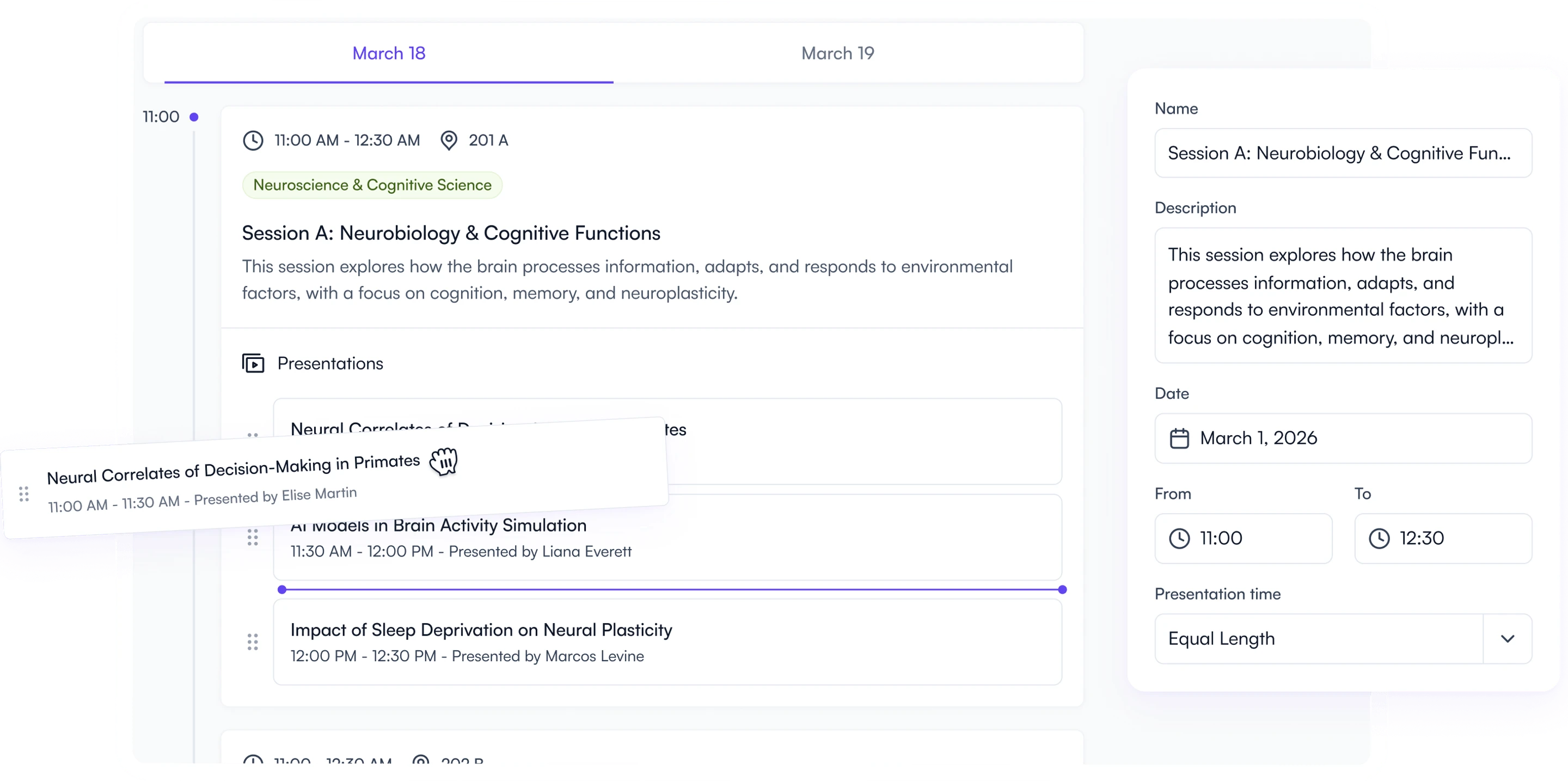
Build from submitted content

Avoid copy-paste errors: drag and drop submitted presentations directly and order them into your sessions with ease.

Last-minute changes? No worries

Updates sync everywhere in real time, on your website, program, and event app.

Attendees will love it

Speaker bios, materials, clear sessions, and personal agendas help attendees plan their itineraries with ease.

Build sessions effortlessly

Build an eye-catching conference program in minutes, complete with sessions, nested presentations, tracks, rooms, livestream links, and more.

See it in action
Drag and drop conference schedule builder in Fourwaves

Solve conflicts & contact presenters

Detect scheduling conflicts and stay and send notifications to presenters, saving time and reducing errors.

See it in action
Presenter email tools in the Fourwaves schedule builder

Update and share instantly

Make last-minute changes and ensure participants always have the most up-to-date version at hand.

See it in action
Conference program displayed on desktop and mobile in Fourwaves

Delightful experience for everyone involved

Effortless conference program management

Turn accepted abstracts into a complete program, update it anytime, and share it instantly.

  • Drag and drop presentations within sessions
  • Auto-detect conflicts with built-in filters
  • Publish on your event website and mobile app
  • Export a professional, ready-to-print program booklet
conference-program-organizer

My presentation, all in one place

Submit once and keep everything updated for a stress-free experience.

  • Update your bio and presentation details anytime
  • Upload slides, posters, videos, and supporting material
  • Receive alerts when your session changes or conflicts arise
conference-program-speaker

Plan and personalize my experience

Find the sessions that matter most and access all the materials in one place.

  • Search by topic, track, or speaker name
  • Bookmark sessions to build your personal agenda
  • View speaker bios and presentation files
  • Download the full program for offline access
conference-program-participant

From abstracts to attendees: all-in-one program management

Unlike generic scheduling tools, Fourwaves was built for research conferences with the organizer and attendee experience in mind.

Drag & drop editor

Quickly create and modify sessions without spreadsheets.

Multi-day & parallel sessions

From multi-day to parallel sessions, your program remains clearly presented.

Conflict checker

Filter for double-booked speakers or overlapping sessions.

Communication tools

Contact presenters of specific sessions effortlessly to keep them up to date.

Conference booklet

Export a professional conference booklet in seconds.

Personalized agenda

Attendees can create their personal schedule for an optimal event experience.

Color-coded tracks

Assign color-coded tracks to help attendees browse the program.

Search and filters

Attendees can easily search and filter through a multi-day program.

Livestream integration

Connect your preferred livestreaming platform for increased reach.

Session recordings

Upload video recordings, so that participants can watch them directly through your program anytime.

Your program, the hub of your conference

The conference schedule connects every part of your event: submissions, speakers, and attendees. Fourwaves brings it all together to facilitate event planning.

Conference program overview in Fourwaves

Flexible for any event

From focused workshops to large, multi-track conferences, Fourwaves adapts to your format and scale.

Integrated with the entire platform

Linked with submissions, reviews, ticketing, and your website to save time and cut workload.

Confidence from start to finish

Know your program is reliable, accurate, and ready, so you can focus on the big picture.

Why choose Fourwaves ?

Without Fourwaves

  • Manual copy-pasting of data from external sources
  • Confusion with Excel file versions
  • Double-booking errors that cause headaches
  • Tedious to communicate with presenters
  • Incomplete session information
  • Last minute updates aren't synced in real time
  • A program that's difficult to navigate

With Fourwaves

  • User-friendly session builder using submitted data
  • One source of truth for your team
  • Conflict checker prevents scheduling issues
  • Easy to send emails to presenters
  • Interactive session data with nested presentations and precise timeline
  • Real time access to the latest program version
  • A detailed or compact grid view that's easy to browse

Frequently asked questions (FAQ)

Our conflict checker automatically detects when presenters are double-booked so you can adjust accordingly.

Yes! Attendees can filter sessions, bookmark favorites, and create a personalized agenda.

Absolutely. Fourwaves lets you export a polished, structured booklet for easy distribution. It can be exported in Word of PDF. You can export just the abstracts, the program or both.

No problem! You can mark the presentation as withdrawn in seconds, and it will be tagged accordingly in the program. If you have time, you can also replace it with another presentation in the session.

Unlike general-purpose event tools, Fourwaves is built for scientific and academic events, with abstract submissions, peer review and virtual poster sessions included. Read our detailed comparisons: Fourwaves vs Cvent and Fourwaves vs Whova.

Jonathan Langlois Gabrielle Laforest Matthieu Chartier, PhD.
Want to talk to a human to ask your questions?