

May 2026 product update: branded event emails, a refreshed dashboard, payment gateway delegation and more

Published on 25 May 2026
The May release ships three major upgrades: branded event emails, a refreshed event dashboard navigation that clears the path for several upcoming features, and a new delegation model for payment gateways that establishes Fourwaves as the most capable event management platform for institutional finance. We also made program search meaningfully smarter for your attendees.
Brand your event emails with a banner, your logo and a custom footer
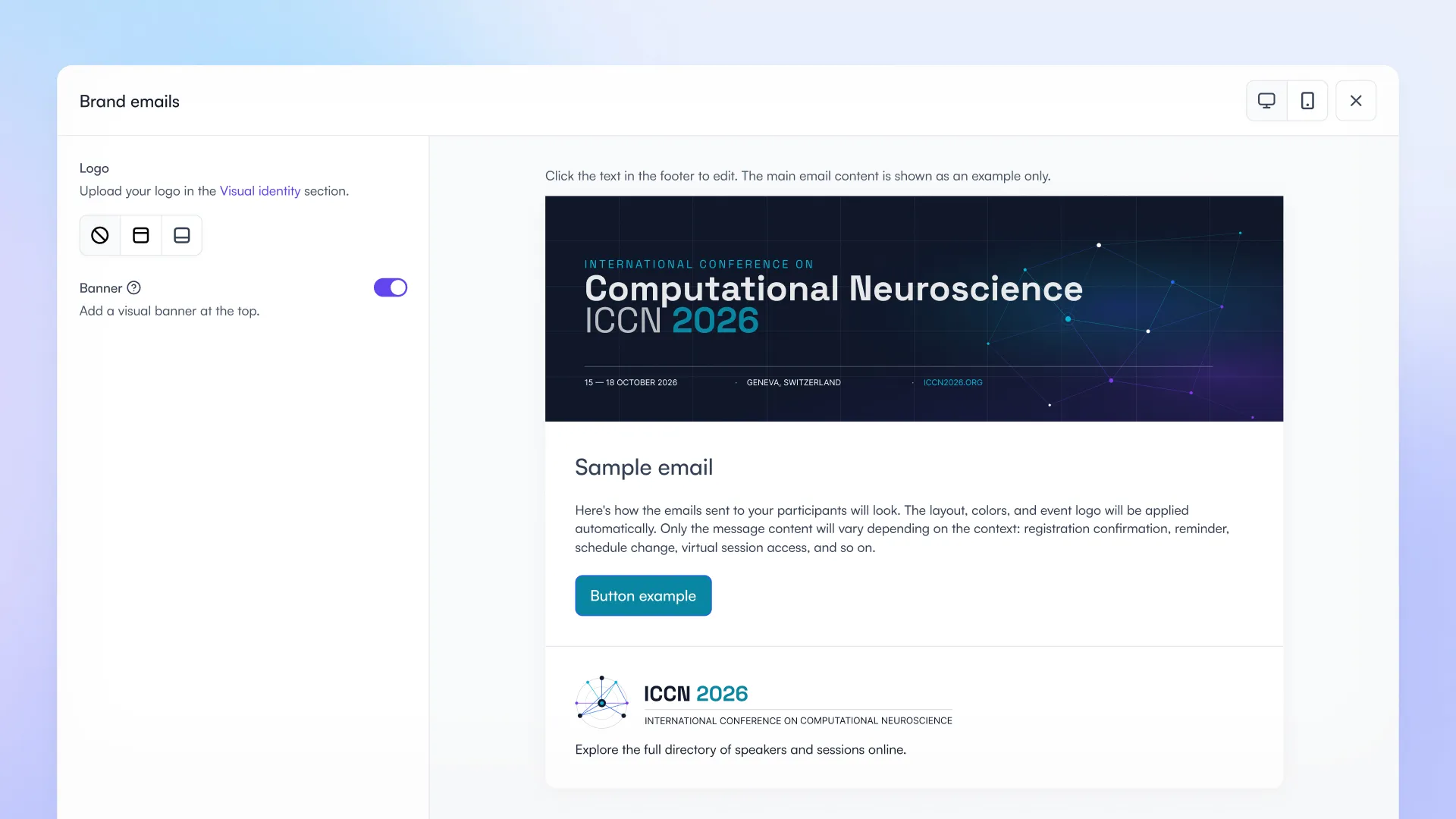
Personalize the branding in your emails for a more professional look.
Until now, every outgoing email from Fourwaves (registration confirmations, reminders, reviewer invitations, mass communications) used a plain, generic layout. That worked, but it did not reflect the identity of the event. Some organizers ended up sending their communications from external tools like Mailchimp just to get a banner and a logo at the top.
That changes in May. Organizers on the Pro tier can now apply consistent visual branding to every email Fourwaves sends on behalf of an event, in a few clicks.
Benefit: Every email reflects the event identity. Participants, speakers and reviewers receive communications that look polished and credible, with no design skills or external tools required.
How it works
You will find the new editor in the Communication section under “Customize email”:
- Add a banner image at the top of every email. The full width banner keeps its native ratio. We often see an image representing the city where the conference is taking place with the event name, dates and sponsor logos.
- Choose where to display your logo: at the top of the email (under the banner) or in the footer. The logo is the same one that appears on your invoices and name badges, managed under Visual Identity.
- Resize the logo with a slider until it sits exactly where you want it.
- Customize the footer text with bold, italics, underline and inline hyperlinks. Add a signature, contact information, or a link to the event website.
- Preview the result in real time, on desktop and mobile.
- The branding applies automatically to every outgoing email: registration and submission confirmations, reminders, mass communications, reviewer invitations, refund notifications and more.
If your event later downgrades from the Pro plan, your settings are kept in the background. Upgrade again and your branding is back exactly the way you left it.
A refreshed event dashboard navigation
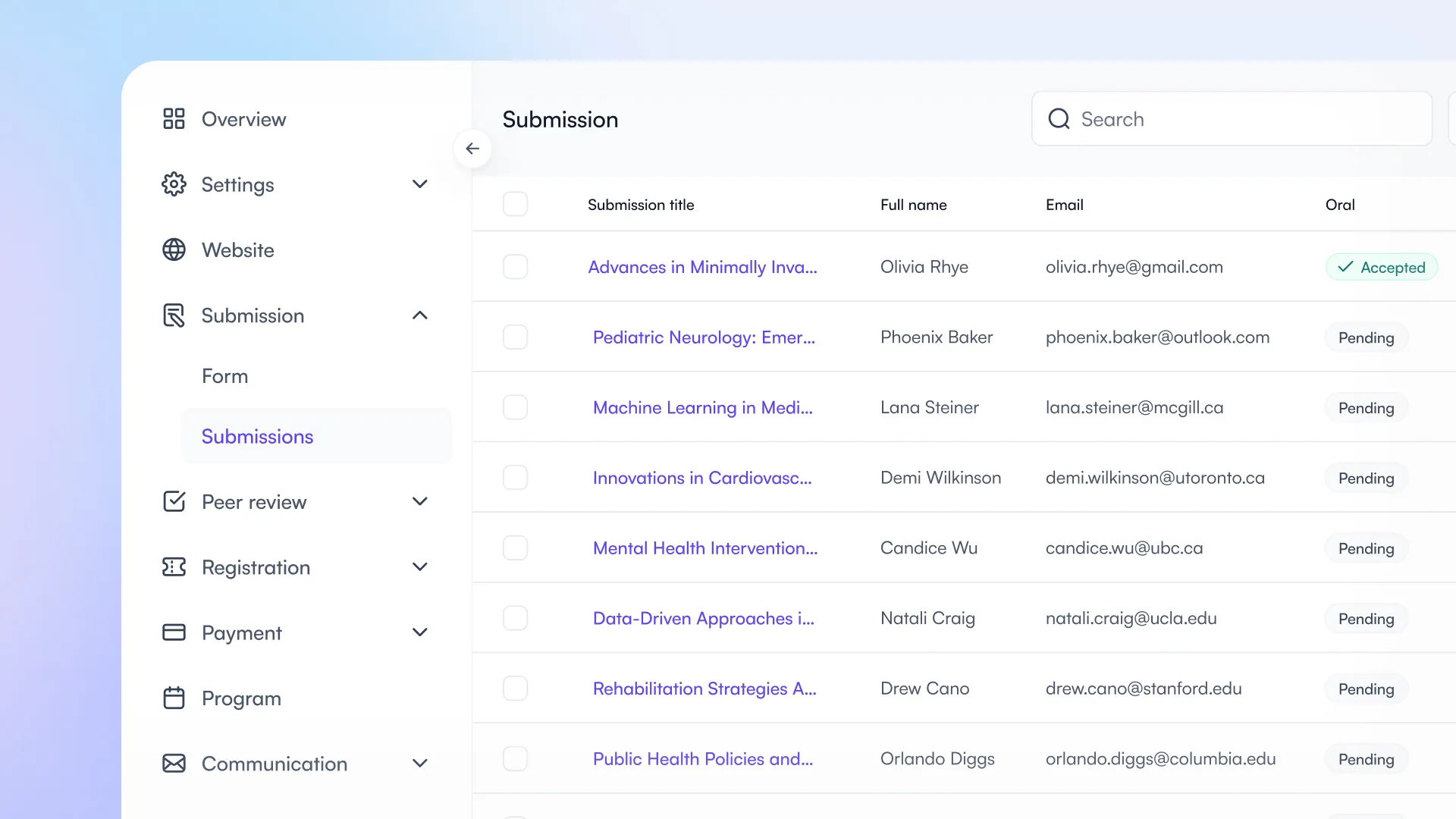
A new navigation divided by themes.
The event dashboard menu has used the same 3 section layout for the past 10 years: Configuration, Website, Data. It worked, but it had two issues:
- New users struggled to find what they were looking for, because the structure did not match the way they think about their event.
- The structure was about to outgrow its purpose with all the upcoming features we have in the works (mobile app, communication automations, etc.).
In May, we shipped the largest navigation revamp in Fourwaves history!
Benefit: Organizers find what they need faster. Everything related to a topic now lives in one place. New organizers ramp up much quicker.
How it works
The menu is now grouped by topic, not by the type of object:
- Overview
- Settings (general, committee, tracks)
- Website
- Registration (form and registrations)
- Submission (form and submissions)
- Peer Review (reviewers, form and reviews)
- Program
- Payment (settings and transactions)
- Communication
Everything that belongs to a workflow lives under that workflow. Looking for the submission form and the submission data? Both are now under Submission. Looking for payment settings and your transactions? Both are now under Payment.
The Website section also got a major upgrade. You now see a full real time preview of your event site directly inside the dashboard.
Add pages, group them, reorder them or rename them from a single Manage Pages drawer.
We brought back icons on the pages that matter most (program, registration, participants, presentations) so they are instantly recognizable, even at a glance.
A small note for veterans: a few items moved. Theme and colors is now under Settings / General / Visual identity. The page previously called “Schedule” is now called “Program” for new events. Existing events keep their original page name.
Payment gateway delegation, built for institutional finance
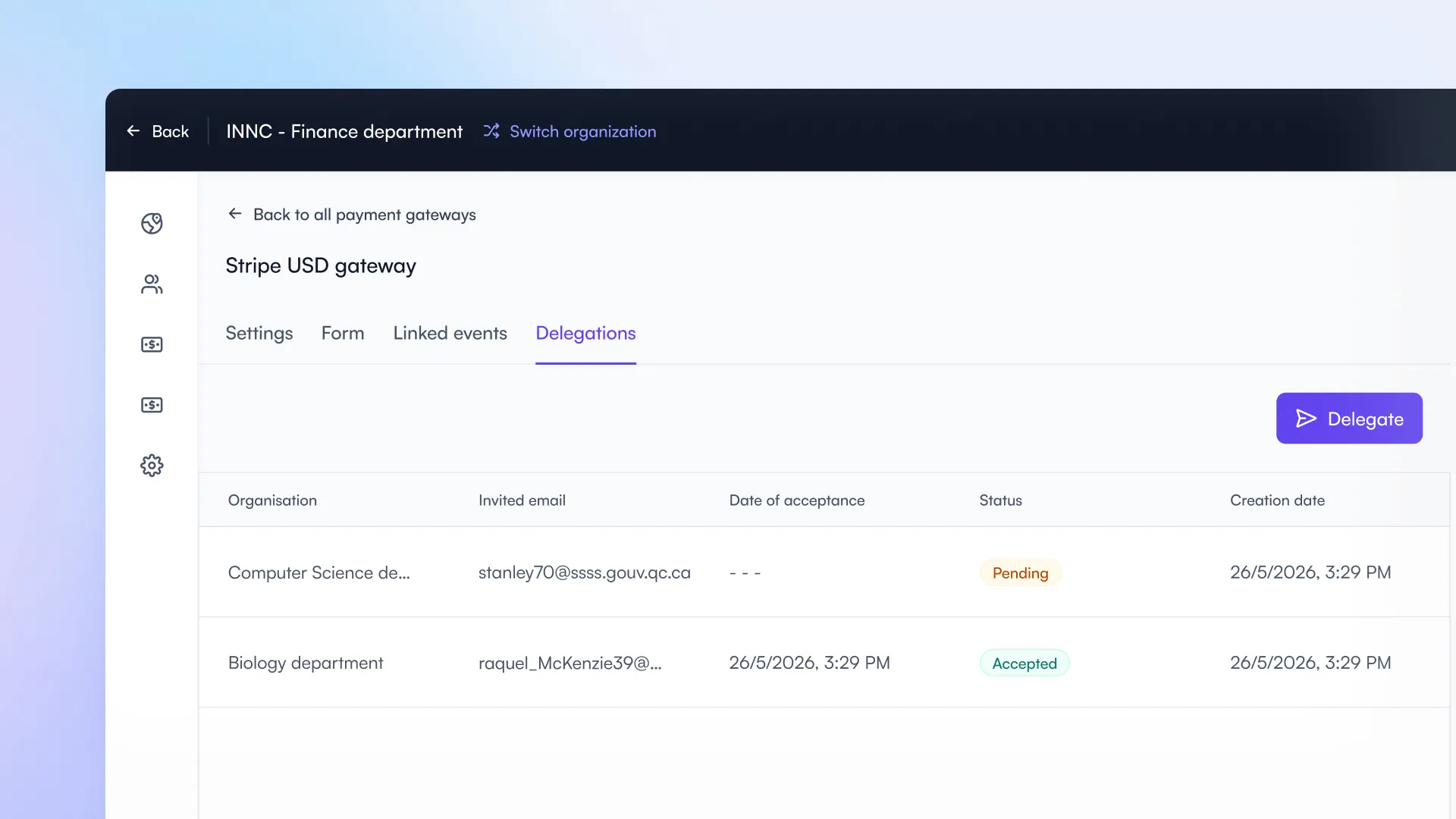
Delegate payment gateways to other organizations and monitor their usage and pull reports.
Universities and large institutions do not operate payment infrastructure the way a single event organizer does. The finance office holds the merchant accounts, sets the controls, runs reconciliation, and answers to audit. Meanwhile, organizers across faculties, departments, research centers, and affiliated societies need access to those gateways without funneling every connection request through finance.
The new delegation model was built for that operating reality. Finance keeps ownership and the controls. Departments and events move faster. Every transaction lands in finance’s reports with the accounting data needed for clean GL reconciliation.
With this release, Fourwaves becomes the most capable event management platform on the market for institutional finance teams.
Benefit: Fewer manual interventions for finance, mandatory accounting data captured at the source for every event, and a complete audit trail from invitation to transaction. Departments and events gain autonomy. The institution gains governance.
How delegation works
- From any payment gateway, finance opens the new Delegations tab and invites an external organization by entering the email of a designated contact.
- The contact receives an invitation that can be used once. When they accept, they choose which of their organizations is linked to the gateway.
- The gateway then appears in that organization’s dashboard with the Settings and Form tabs locked.
- They can connect events to it, but they cannot change how it is configured.
Less intervention, more control
Once a gateway is delegated, departments and event organizers can connect their events to it autonomously. Finance does not have to step in to approve each connection one by one.
For environments that require stricter control, an approval step can be turned on: every new event then flows through finance before it can collect a payment on the gateway.
Mandatory accounting data, captured per event
When configuring a delegated gateway, finance can require any field the institution needs to reconcile against its general ledger:
- Revenue and expense accounting codes
- Fund codes
- UBRs
- Project codes
- or any custom field.
Events cannot connect to the gateway without filling them in. The data then flows directly into the gateway’s transaction reports, ready for export and reconciliation.
No more chasing organizers after the fact to get the codes for last month’s transactions.
Auditable governance, end to end
A complete delegation log records who has access to each gateway and which organization they accepted on behalf of. Every event connection on a delegated gateway is also logged with the user who initiated it and the timestamp.
Finance gets a per event overview and detailed transaction reports across the entire delegation network, so audit and reconciliation are always one click away.
One operational detail that matters for institutional governance: when an external organization connects an event to a delegated gateway, the connection request goes to the admins of that organization, not to your finance team. Finance retains oversight without becoming the bottleneck for every connection across the institution.
Smarter program search and filtering
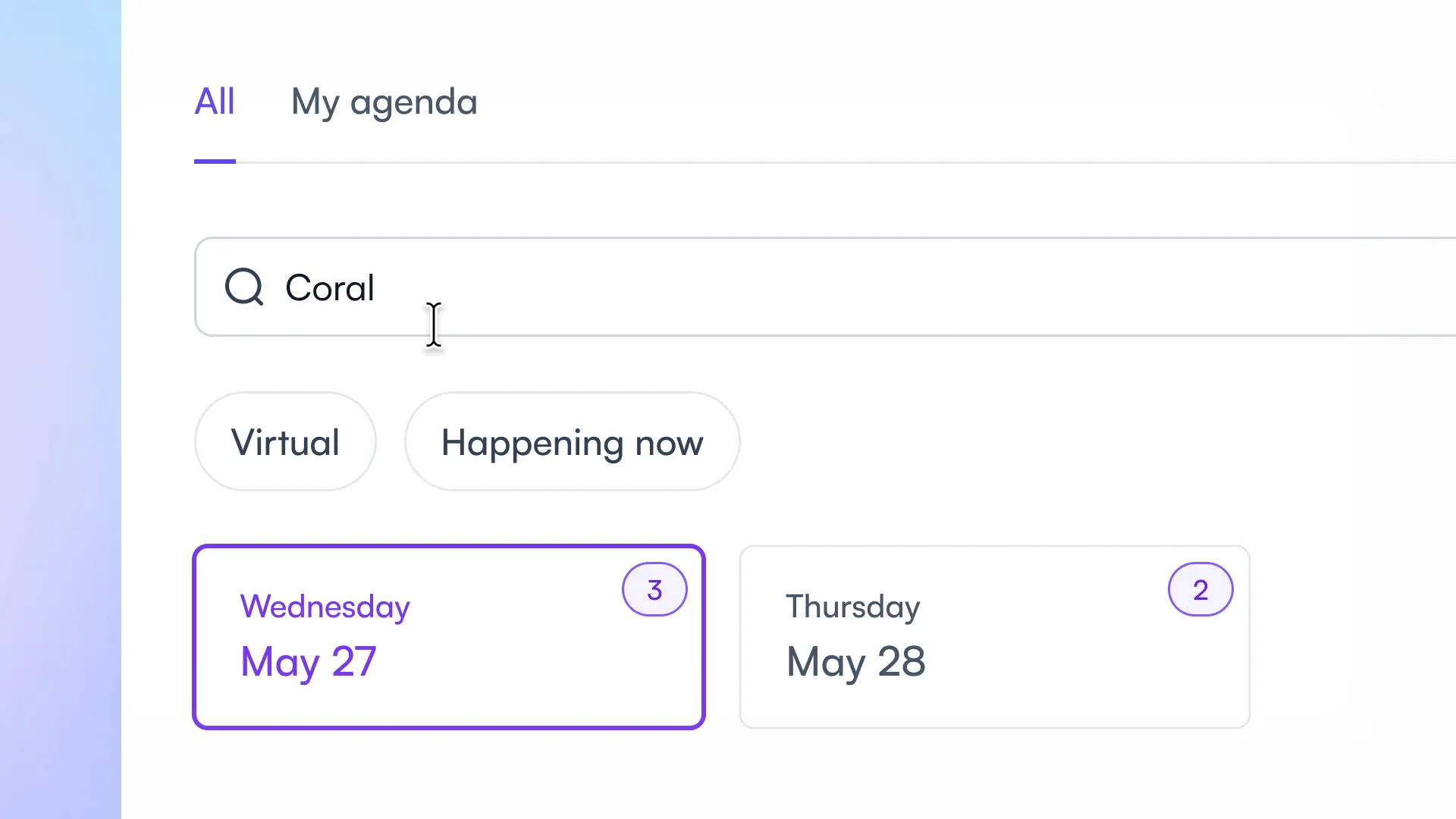
The search functionality in the program has been improved to help attendees find what they are looking for.
When attendees search or filter inside the Program or My Agenda views, the date picker at the top now works harder for them.
Benefit: Attendees never hit a dead end when their search result exists on another day, and they can instantly see which days hold the most relevant sessions.
How it works
- Result counts on each date. When attendees type a search term or apply filters (track, room, tags), every date in the carousel shows a badge with the exact number of matching sessions on that day. They can see at a glance which days are worth exploring, without clicking through each one.
- Automatic date switching. If they are viewing a specific day and search for something that does not exist that day, the view jumps automatically to the first date with matching results. No more empty “No sessions” screens when results exist next door.
Example
An attendee is viewing Monday and searches for “keynote.” There is no keynote on Monday, but there is one on Wednesday. The view jumps to Wednesday and shows a “1 result” badge on that date tile.
The change applies everywhere attendees browse the program: the event website, the virtual platform and the upcoming mobile app launching this summer.