

Event registration software built with academics in mind
Deliver a smooth experience for your conference or symposium attendees, without the limits of generic registration platforms.
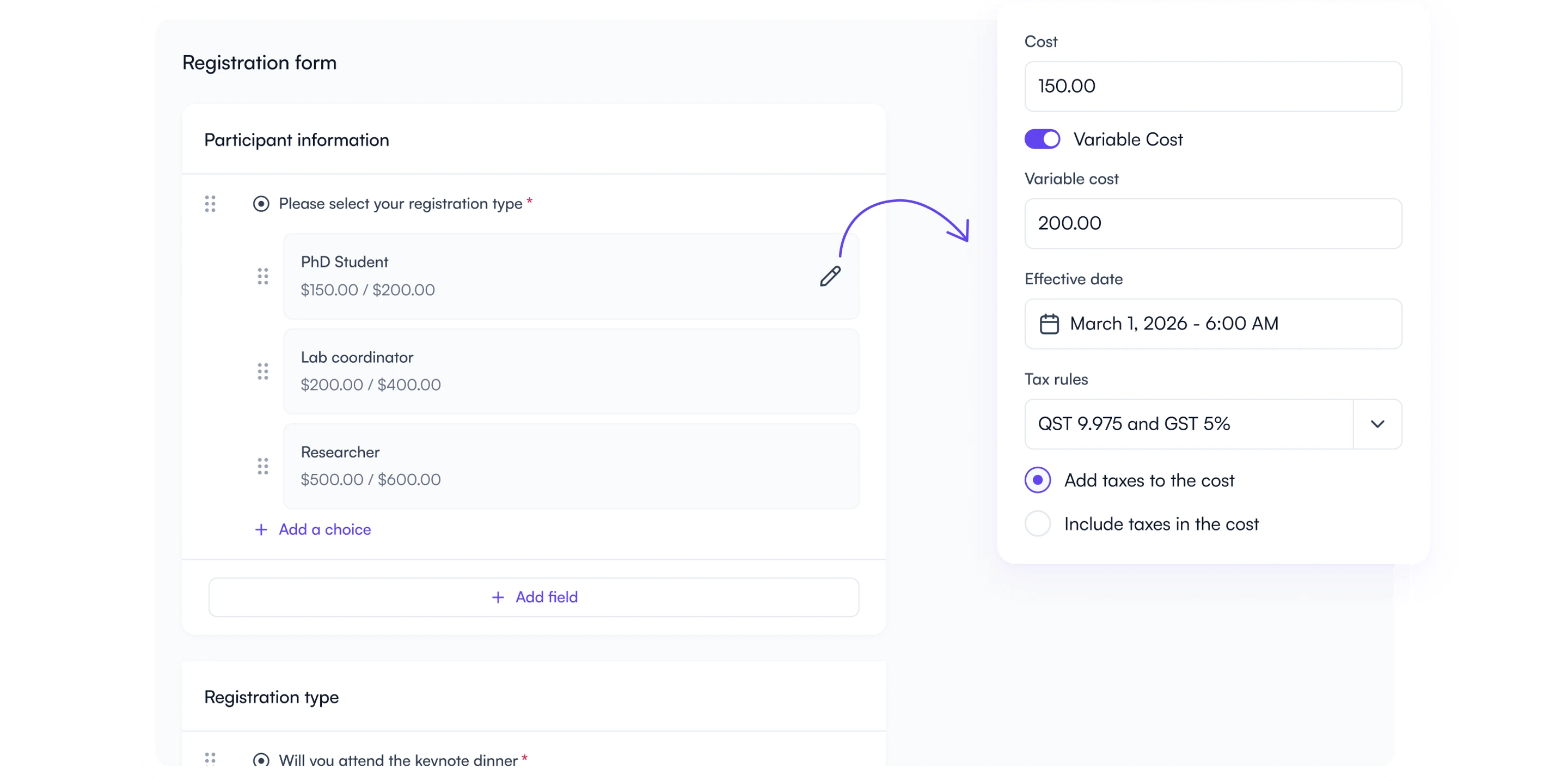


















Effortless for organizers. Delightful for attendees.
Flexible forms
Add your form fields, prices, capacity limits, and have all the data at your fingertips to simplify logistics.
Secure payments, zero friction
Accept cards or enable invoice payments for secure, PCI-compliant payments and refunds.
50 % less admin
Automate your operations, eliminate manual data entry, and link registrations to presenter information.
Build exactly the form you need
Drag-and-drop fields, ticket types, set conditional logic and automatic early-bird-to-regular price switches, without asking help to IT services or to expensive consultants.
See it in action
Collect money your way
Accept credit cards or route payments through your university gateway, automatically issue invoices for bank transfers, and process refunds easily.
See it in action
Report, reconcile, communicate in real time
See who paid, who still owes, and who needs a reminder. One click to email, export, or print name badges.
See it in action
Speed up document delivery
Generate custom name badges or automatically distribute certificate of attendance with your own logos, signatures and text.

Something for everyone
Finally, no more overwhelm
Automate registrations, confirmations, and refunds while tracking attendee data in real time.
- Clone or tweak forms mid-cycle, registrants stay intact
- Early-bird, regular, late pricing that flips automatically
- Country-specific tax rules, VAT/GST/QST ready
- Auto confirmation & certificate emails
- One dashboard for refunds, waitlist, and badge printing

Stress-free checkout
Enjoy a smooth, secure checkout and receive personalized updates instantly.
- Pay with your preferred method
- Re-open your registration to add items or download receipts
- Instant confirmation and calendar invites
- Receive updates on the event

Reconciliation in one line item
Track revenue in real-time, and get detailed financial insights effortlessly.
- PCI-compliant processing via your existing gateway
- Live revenue and tax breakdowns, exportable to CSV
- Full audit trail for invoices, refunds, and adjustments
- Compatible with university FOAPAL / cost-center workflows

Registration & payment tools built for academic events
Seamless, secure, and integrated to your event management workflows.
Drag-and-drop form builder
Customize your registration form fields, logic, and pricing tiers in minutes.
Early-bird & tiered pricing
Automatic date-based pricing, no midnight updates.
Secure payments
PCI-compliant payment compatible with multiple gateways.
Global tax engine
Specify tax rules that adapt to the attendee's country on a per-item basis.
Capacity & waitlists
Set capacity for sessions, workshops or your event and activate a waitlist to maximize attendance.
Synced with presenter data
Spot unregistered presenters and follow up automatically to them.
Promo codes
Share discount codes for exhibitors or promotions to increase ticket sales.
Last-minute changes and refunds
Switch a paid option for another, even after registrations closed and issue full or partial refunds..
Keep participants informed
Setup automated confirmations and send email notifications to all or to specific groups.
Name badge generator
Automatically create print-ready badges with custom information and branding.
Credit card or invoicing
Allow participants to choose their preferred payments method.
Real-time reports & exports
Access live registration data, revenue, taxes, and on-site check-in lists.
Certificates
Generate and distribute custom certificates with your own logos, signatures and text.
Checked by the Event Assistant
AI checks flag misconfigured fields, missing translations, and typos before attendees register.
From first registration to final report, all in Fourwaves
Fourwaves streamlines registration and payment management, freeing up your time to focus on delivering impactful academic events.

Save days of work
Be up and running in minutes and save admin-time with automated confirmations, updates and no repetitive tasks.
Reclaim your autonomy
No more reliance on IT or consultants. Do everything quickly through an intuitive, easy to use interface.
Be more organized than ever
Registration data is at your fingertips and linked to presenter profiles, so you’re prepared at every stage.
Why Fourwaves?
Without Fourwaves
- Confusing registration experience
- Rigid forms built for other event types
- Spreadsheet juggling
- Disconnected speaker data
- Seperated from your website
- External refunds & messy reconciliations
With Fourwaves
- Smooth, simple registration flow
- Flexible forms built for academic events
- Up to date, centralized data
- Integrated with speaker information
- Integrated to your event website
- One-click refunds and up to date ledger
What is conference registration software?
Conference registration software is the system an event organizer uses to take attendee registrations and payments online: publishing a registration form, selling registration types and add-ons at different prices, collecting card or invoice payments, issuing receipts and refunds, and exporting the participant list for badges and check-in. It is also called event registration software, event registration and payment software, an online registration system, or, in academic settings, a “reg system”. Generic ticketing platforms such as Eventbrite handle the payment step, conference registration software for academic conferences also links each registrant to their abstract submission, presenter role, and sometimes connect with institutional payment gateways.
Fourwaves event registration is built for academic conferences and the events around them: annual meetings, symposia, research days, and continuing-education programs. The form, payments, participant list, and event website live in one platform.
How registration and payments work in Fourwaves
- Build the registration form. Add any question type (text, multiple choice, file upload), mark fields mandatory, and show different questions to different people: a speaker sees the presenter questions, an exhibitor sees the booth questions, and a virtual attendee skips the dietary field. Every question becomes a filterable column in your participant list.
- Set prices and registration types. Put a price on any item: one-day or full-conference registration, student and regular rates, member and non-member rates, gala dinner, workshops, or excursions. Early-bird, regular, and late prices switch automatically on the dates you set and promo codes, capacity limits, and waitlists are built-in.
- Connect your payment gateway. Organizers connect their own payment account (Stripe, PayPal, or an institutional gateway such as Moneris, Authorize.NET, Global Payments, Bambora or TouchNet). Attendee payments go directly to the organizer’s account, Fourwaves never holds the funds. Attendees can choose to pay later by invoice and bank transfer, a common choice for university departments. Taxes rules for VAT, GST, QST can be set per item according to the attendee’s country.
- Confirm, invoice, and adjust. Registrants receive a confirmation and a detailed invoice with line items, taxes, and your seller terms. They can reopen their registration to add a paid item or download a receipt. Organizers can switch one paid option for another, issue full or partial refunds, and lock options after a given date.
- Report and deliver documents. Live dashboards show who paid, who still owes, revenue and tax breakdowns, all exportable to CSV or Excel. You can generate ready to print name badges and send custom certificates of attendance with your logo and signatures.
What should universities look for in registration software?
Procurement and finance offices at universities ask four things of a registration system. First, where the money goes: payments should settle in the institution’s own merchant account, not a vendor’s. Second, payment compliance: card data must be handled by a PCI-compliant gateway. Third, invoicing: registrants who cannot pay by card need an invoice they can settle by bank transfer. Fourth, data protection: attendee data stored in a known jurisdiction (Fourwaves hosts in Montreal, Canada) with a data processing agreement available. Fourwaves meets all four, which is why finance teams at universities such as McGill, Université Laval, and the University of Manitoba connected their institutional gateways to it. Comparing options? See the best event registration platforms for academic conferences and Fourwaves vs Cvent.
Trusted by leading institutions worldwide
Top organizations rely on Fourwaves to deliver exceptional events with ease.


Co-founder, Cure VCP Disease


Senior Program Assistant, Department of Physical Therapy, UBC


Program Coordinator, Department of Psychiatry & Behavioural Neurosciences, McMaster University


Communication Associate, Events, The Neuro


Harvard Medical School


McGill University


Science.org

Office of Research, University of Florida College of Medicine

Outreach and Strategic Partnerships in Asia, AAAS
Frequently asked questions
The Fourwaves registration form takes any type of question: text answer, multiple choice, file uploads and more. Using conditional logic, you can build different registration flows for registrants, speakers or exhibitors.
You can set capacity limits, availability dates, mandatory fields and more.
Registration types and add-ons are priced items in the Fourwaves registration form: you set a price on any item: registration types such as one-day, full conference, student, or regular in a multiple-choice question, plus paid add-ons like a gala dinner, a pre-conference workshop, or an excursion. There is no limit on the number of priced items, and each add-on can have its own capacity and availability dates.
Fourwaves lets you define member and non-member registration rates in the same form, either as separate registration types or through a question that unlocks the member price. For societies that want to verify membership automatically, an integration with your membership platform is possible on request.
Registrants in Fourwaves can reopen their own registration to add and pay for a new item, update their answers, or download their receipt, without contacting the organizer. Organizers can lock specific options after a given date, switch a paid option for another one and send the updated invoice even after the registration deadline, and issue partial or full refunds.
To accept payments, Event Organizers must connect their own independent payment gateway account (such as Stripe or PayPal). All attendee payments are processed directly through the Organizer’s connected gateway, and funds are routed directly to the Organizer.
Participants receive a detailed invoice from Fourwaves, with the event name, participant name, line items with their costs, a tax breakdown, vendor information and more.
You can customize them to add your own terms.
Fourwaves keeps incomplete and unpaid registrations out of your participant list: you mark fields as mandatory and require payment before a registration is confirmed, so the participant list only contains people who completed the form and paid. Registrants who chose invoice payment appear with an unpaid status you can filter on and remind in one click.
Fourwaves works for free events: do not specify any cost on your registration page, and registrants only need to fill all mandatory fields to register.
Unlike general-purpose event tools, Fourwaves is built for scientific and academic events, with abstract submissions, peer review and virtual poster sessions included. Read our detailed comparisons: Fourwaves vs Cvent and Fourwaves vs Whova.