

Peer-review software built for academic conferences
Save time on your peer review process with intelligent, intuitive software that your reviewers will enjoy, fully integrated with your conference workflow.
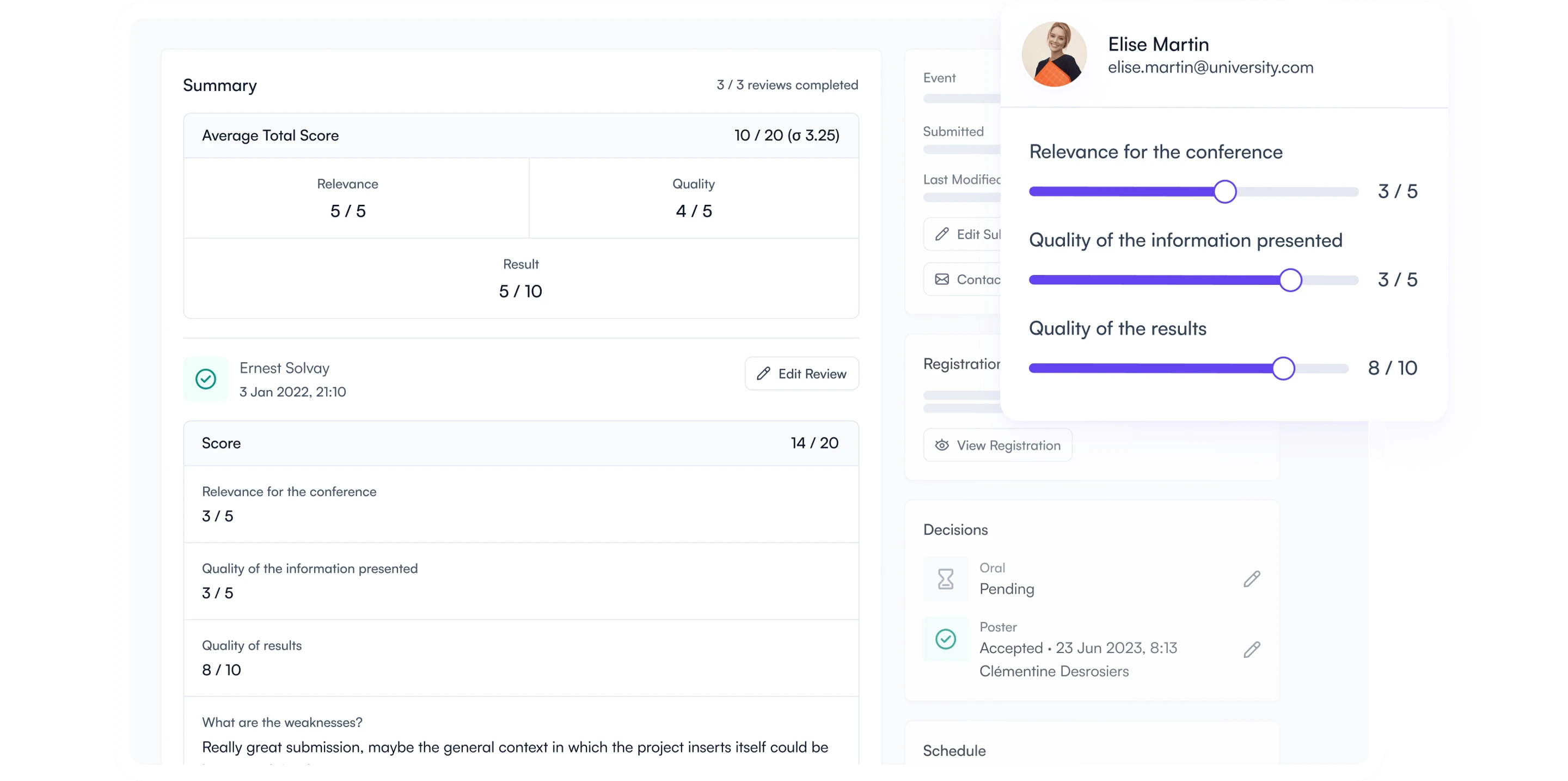

















Take the complexity out of peer review management
Adapt it to your context
Make no compromise with highly customizable forms, single/double-blind options, data visibility settings and revision flows.
Automate your workflow
Avoid tedious manipulations with intelligent reviewer assignments, simple feedback sharing and built-in program builder.
Meet your deadlines
Stay on schedule with real-time tracking of the review progress, the ability to make adjustments along the way and email reminders.
Flexible evaluation workflows
Use customizable scoring forms with qualitative and quantitative questions, ensuring data driven decisions.
See it in action
Smart reviewer assignment
Automatically or manually distribute submissions based on custom criteria and ensure fair distribution.
See it in action
Structured feedback & decision management
Aggregate scores, filter by presentation type, and easily finalize decisions while maintaining transparency for authors.
See it in action
Something for everyone
Total control, zero chaos
Assign, track, and manage peer reviews effortlessly, all in one place.
- Create custom criteria and scoring
- Automatically or manually assign submissions
- Track real-time reviewer progress and send reminders
- Easily manage the author revision process

Effortless reviewing
Access assigned submissions, provide feedback, and track deadlines in one place.
- Access your assigned submissions easily
- See the submission and the reviewing form side-by-side
- Provide feedback easily with clear structured forms
- Track your progress and deadlines

Seamless decision-making
Access review outcomes, finalize decisions, and build sessions effortlessly.
- View consolidated reviewer feedback in a single dashboard
- Accept or reject submissions based on clear scoring
- Send acceptance or rejection notifications
- Oversee the final program and group accepted work into sessions

Transparent & efficient feedback
Easily submit, track, and receive structured feedback on your work.
- Submit work in multiple formats (Text, Word, PDF, PPT, etc.)
- Track submission status in real time
- Receive structured, actionable reviewer feedback

Powerful features, simple execution
Discover key features that enhance your peer review workflows, ensuring a structured, friction-free process for everyone.
Customizable forms
Tailor your reviewing forms to your needs with qualitative and quantitative fields.
Blind review options
Reduce bias and ensure anonymity with single- or double-blind settings.
Automated assignments
Batch assign reviewers to submissions based on custom constraints.
Communicate decisions
Contact authors to ask for revisions or notify them of acceptance and next steps.
Collaborative feedback
Decide which reviewer feedback authors can see, if any.
Easy revisions
Share files with tracked changes from reviewers to authors automatically.
Unlimited reviewers
Scale with no reviewer limits, making it easy to accommodate more team members.
Track-specific committee
Allocate specific tracks to committee members so they focus on content within their area of expertise.
Easy data export & insights
Download reviews, scores, and decisions in multiple formats.
Build your program
Create sessions and build your program with the top scored submissions.
Export your proceedings
Export accepted abstracts in a Word document including images and submission information.
Generic platforms don't get it. We do.
Unlike generic event software, we know what academic events need and we've built-it to save you the extra work.

Smarter assignments
Prevent conflicts and manual work with automated reviewer assignments and specialized committees by track.
Specialized to academics
Built specifically for research-focused events, you won't need to make dreadful compromises.
All-in-one conference software
Streamline your whole conference management with integrated registration, conference program and website.
Transform your peer review process
Without Fourwaves
- Workdays lost due to manual assignements
- Inconsistent feedback due to unstructured reviews
- Frustrated reviewers
- Wasted time running after spreadsheets
- Missed deadlines that delay your planning
- Non-registered speakers impossible to find
With Fourwaves
- A smart and automated reviewer assignment engine
- Standardized, structured feedback for clarity
- Happy reviewers
- Centralized data, always up to date
- Deadlines met, stress reduced
- Every speaker is registered and easy to track
What is peer review software for conferences?
Peer review software for conferences is the tool a program committee uses to evaluate abstract submissions before a scientific meeting: assigning each abstract to reviewers, collecting scores and comments on a review form, comparing results, and recording accept or reject decisions. It is also called abstract peer review software, academic peer review software, a conference review system, or peer review management software. Journals use similar tools for manuscripts, but conference peer review runs on a deadline of weeks, not months, and usually feeds directly into the conference program.
Fourwaves peer review software is built for academic and scientific conferences and connects to the same platform that collects the abstract submissions, registers the participants, and publishes the program. A committee that reviews 30 posters for a research day and a committee that reviews 2,000 abstracts across parallel tracks use the same workflow. The Microscopical Society of Canada has run its annual meeting’s abstracts and peer review on Fourwaves since 2019, and a single organizer handled EPIP 2025 with more than 200 submissions and close to 30 reviewers.
How the peer review process works in Fourwaves
- Build the review form. Add scoring questions on any scale (out of 5, out of 10, or your own rubric), multiple-choice criteria, free-text comments for the program chair, and file uploads so reviewers can return an annotated Word document. Reviewers see the submission and the review form side by side.
- Choose the blind review setting. Single-blind review hides reviewer names from authors. Double-blind review also hides author names and affiliations from reviewers. Both are possible on Fourwaves.
- Assign reviewers. The assignment engine distributes submissions to reviewers automatically, based on the target number of reviews per abstract and the topics each reviewer covers, and never assigns a reviewer to a submission they co-authored. You can adjust any assignment by hand, and track-specific committees keep reviewers inside their area of expertise. There is no limit on the number of reviewers and you can set a reviewer workload.
- Track progress and send reminders. A dashboard shows which reviews are complete, which are late, and which reviewers need a reminder email before the deadline. Organizers can easily communicate with reviewers with pending assignments.
- Decide and notify authors. Scores are aggregated per submission and filterable by presentation type or track. Record decisions, then email authors their acceptance, rejection, or revision request in bulk, with next steps. You choose which parts of the review, if any, authors can read from their own dashboard.
- Handle revisions and build the program. Authors can upload a revised file with tracked changes and edit their submission. Accepted abstracts flow into the conference program builder and the book of abstracts export.
Can you run conference peer review for free?
Peer review can be run for free with a do-it-yourself workflow: collect abstracts through a submission form (Fourwaves or a generic form builder), export an abstract booklet in Word format with the information you need, assign reviewers by hand, and gather scores in a shared document. This works for a single-track event with one committee and a few dozen abstracts. It becomes harder to manage once you need conflict-of-interest safeguards, to automate assignments, to send reminders, or when you have a lot of submissions and reviewers because score tally becomes manual work. That is the point where organizers use a paid version with the peer review module rather than lose committee weekends to spreadsheets. Comparing tools first? See Fourwaves vs EasyChair, Fourwaves vs Ex Ordo, and the best peer review software roundup.
Trusted by leading institutions worldwide
Top organizations rely on Fourwaves to deliver exceptional events with ease.


Facility Manager, Centre for Advanced Light Microscopy (CALM), McMaster University

USASP


Virginia Tech

Office of Research, University of Florida College of Medicine


Harvard Medical School

Outreach and Strategic Partnerships in Asia, AAAS


Tulane University

McGill

University of Queensland
Frequently asked questions
You can add any required questions and specify exactly what reviewers should consider for each one.
You can include scoring questions (out of 5, 10, or any scale you prefer) to establish a grade, file uploads (e.g., a Word document annotated by the reviewer), free-text comments for the program chair, multiple-choice options, and much more.
You can hide submitters’ and authors’ identifying details from reviewers, and also hide reviewers’ names from authors if you choose to share the results with them.
Our intelligent algorithm assigns reviewers based on the target number of reviews and the topics covered, while preventing conflicts of interest to ensure a balanced process.
You can manually adjust assignments when needed.
Fourwaves communicates decisions to authors from the platform: submissions are grouped by the committee’s decision (accepted, rejected, revision requested), and you email each group from the platform with the decision, the presentation format, and next steps such as registration or poster upload. Personalized fields fill in each author’s details automatically.
Only if you choose to share them. In Fourwaves you pick which parts of the review form authors can see (for example the written feedback but not the numeric scores) and when they become visible. Authors then read the feedback from their own dashboard; reviewer names stay hidden under blind review settings.
Fourwaves exports your data for the conference or for publication: you can export all files into clearly labeled folders and generate a uniform Word document containing all information from accepted submissions, allowing you to create a structured abstract booklet by session, presentation type, or other criteria, for the conference or for publication purposes.
You can, but it’s typically a “DIY” workflow: collect submissions in a form, export to a spreadsheet, assign reviewers manually (or automatically), and track scores/comments in shared documents.
This can work for small events, but it gets messy fast when you have multiple tracks, conflicts of interest, or larger program committees.
Fourwaves can help you run the call for abstracts and peer review only. Organizers publish a submission form, assign reviewers, record decisions, notify authors and export the book of abstracts without using other modules like event registration or the event website. The free plan covers 25 submissions per event and paid plans have a flat annual fee. Registration, payments, the program, the mobile app and the event website are on the same event whenever they are needed, this year or at the next edition, with no migration and no second vendor. Oxford Abstracts and EasyChair also handle abstracts alone, but adding registration, payments, a mobile app or an event website means a second tool.
Fourwaves, EasyChair, Ex Ordo and Oxford Abstracts all run abstract submission and peer review for academic conferences; the differences are what happens after acceptance and how you buy. Fourwaves adds registration and payments, an event mobile app, the event website and the program on the same event, publishes flat annual prices, includes a free plan with 25 submissions per event, and keeps past events online indefinitely, so a committee can start with abstracts alone and add the rest at the next edition. Oxford Abstracts offers a paid symposium add-on for collecting symposia with their own sub-abstracts, prices per event, and guarantees event data access for one year (its pricing page, checked September 2026). Ex Ordo prices by quote after sales demos, collects panel and symposium submissions natively since January 2025, and syncs member status from Naylor Novi AMS, an association management system, on request, which suits associations that need that specific integration. EasyChair handles no payments and no event website. Detailed comparisons written by Fourwaves: Fourwaves vs EasyChair, Fourwaves vs Ex Ordo and the best Oxford Abstracts alternative.